Chapter 1 Funding Reports
1. Account Funds
-
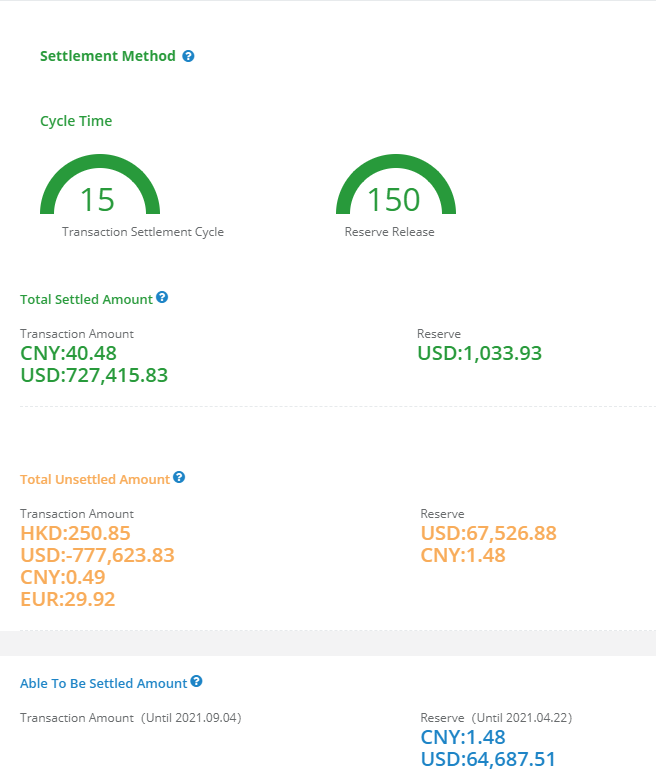
Know about the overall fund situation of the account, as follows:
-
The displayed data is the settlement currency and debit amount.
- Total Settled Amount: Cumulative total of actual settled amount (Fees Deducted).
- Total Unsettled Amount: Unsettled transaction amount (Fees undeducted, including the amount able to be settled).
- Total Unsettled Reserve: Held rolling reserve + fixed reserve + deposit for settled transactions.
- Able To Be Settled Amount: The amount that has met the settlement cycle and currently meets the corresponding settlement condition.
- Merchant Settlement Condition: If the settlement condition is order review + upload shipping info, the displayed amount is the amount of the order that has met settlement cycle and the shipping info has been uploaded, also the delivery status is “Signed For”. This amount is only for reference and will be updated once the logistics status changes.
- Settlement Condition: If the settlement condition is free from order review + upload shipping info, the displayed amount is the amount of the order that has met settlement cycle and the shipping info has been uploaded. This amount is only for reference and will be updated once the logistics status changes.
2. Trans Details
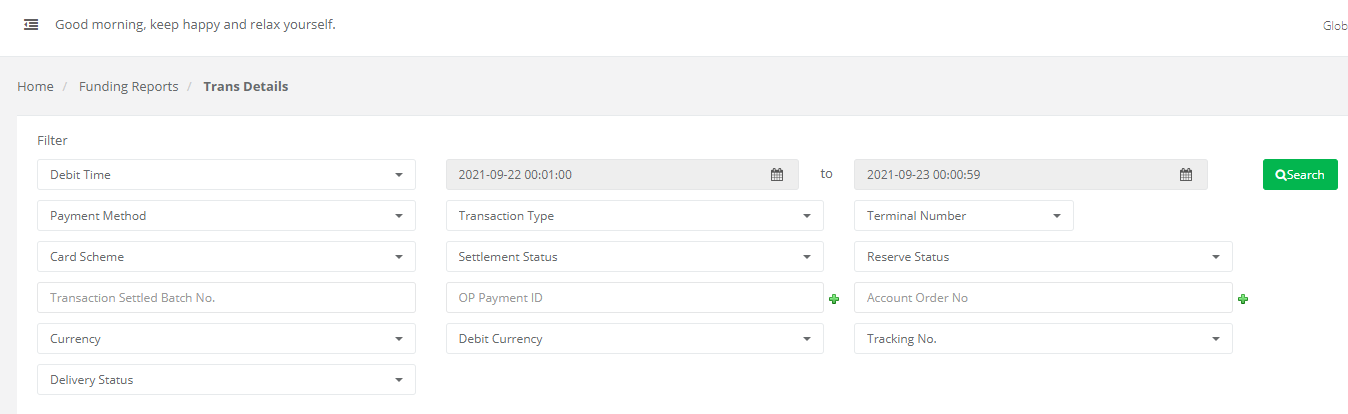
- The transaction status can be queried according to different conditions and time periods, it’s convenient to view statistics data, and download the Excel/CSV of transaction details which is displaying the positive and negative numbers by transaction type. The query filter conditions are shown as follows:
-
Payment Method: Credit Card、Alipay、WeChatpay or other applicated payment methods.
-
Transaction Type: Approved, Refund, Chargeback, Retrieval, Retrieval Void, Chargeback Reversed, Failed.
-
Time Type: Debit Time - Time for settlement and statement statistics.
-
Tracking No.: Orders can be filtered and queried as the logistics information have been synchronized or not.
-
Delivery Status:
-
Blank: The logistic status of this order has not been reviewed or the shipping info has not been uploaded.
-
Not Signed For: The logistic status of this order has not been signed.
-
Signed For: The logistics status of this order has been signed for.
-
Abnormal: The logistics of this order is abnormal, need to check whether the uploaded information is correct or not, upload again if applicable. Note: The query conditions of the tracking number and the delivery status only take effect for the "Approved" transaction type orders.
-
Settlement Status: Settled, Non-settled, this condition allows you to statistics on the amount of settled or non-settled orders.
-
Debit Amount: The amount of the transaction is converted into the settlement currency at exchange rate on the day of transaction, and the settlement and billing are based on this amount.
-
Amount Statistics: Total amount (debit amount and transaction amount) of orders queried by selected time, status and other conditions.
3. Trans Settlement
-
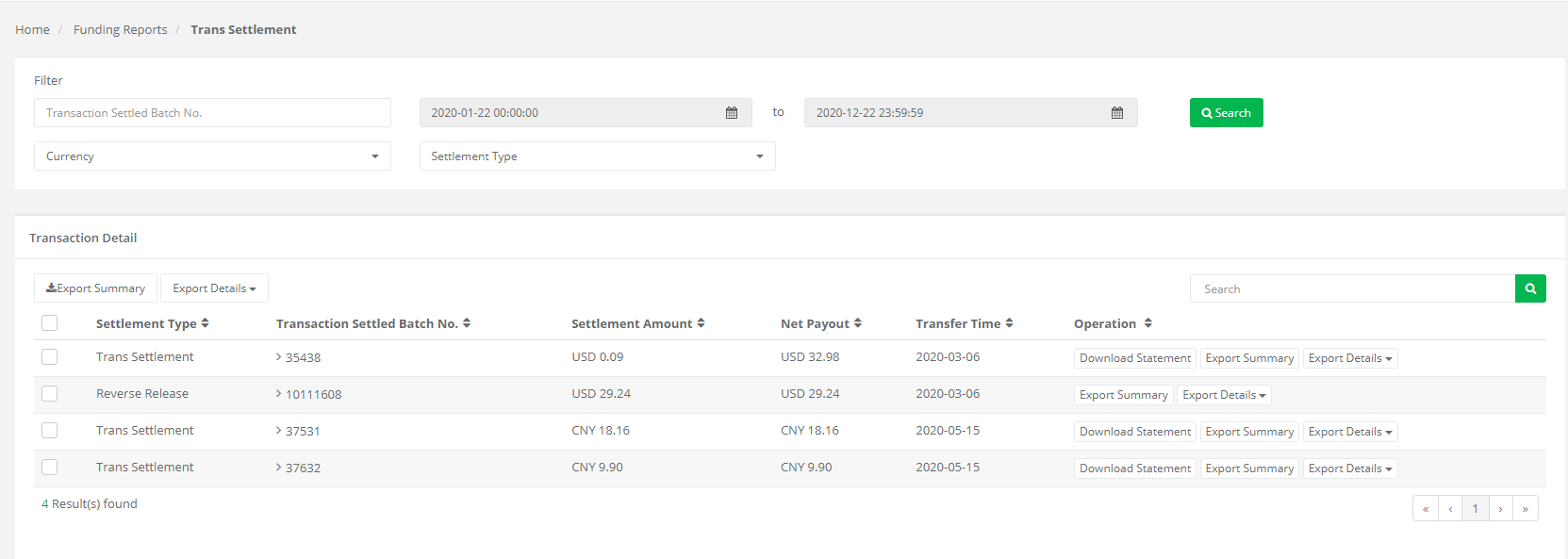
Query the status of each transaction settled batch, download the statement and details.
-
The transaction settled batch can be checked by selected settlement currency, settlement type and transfer time.
- Download Statement (PDF): Download the PDF statement to verify the settlement status of the transaction settled batch (for transaction settlement types only, see Chapter 3 for statement types).
- Export Summary(Excel): Download the summary table of the corresponding batch (for batches download, select the batches you need and click on the "Export Summary" button at the top left).
- Export Details (Excel/CSV): Download the deduction and settlement details for each order of the corresponding batch (for batches download, select the batches you need and click on the "Export Details" button at the top left).
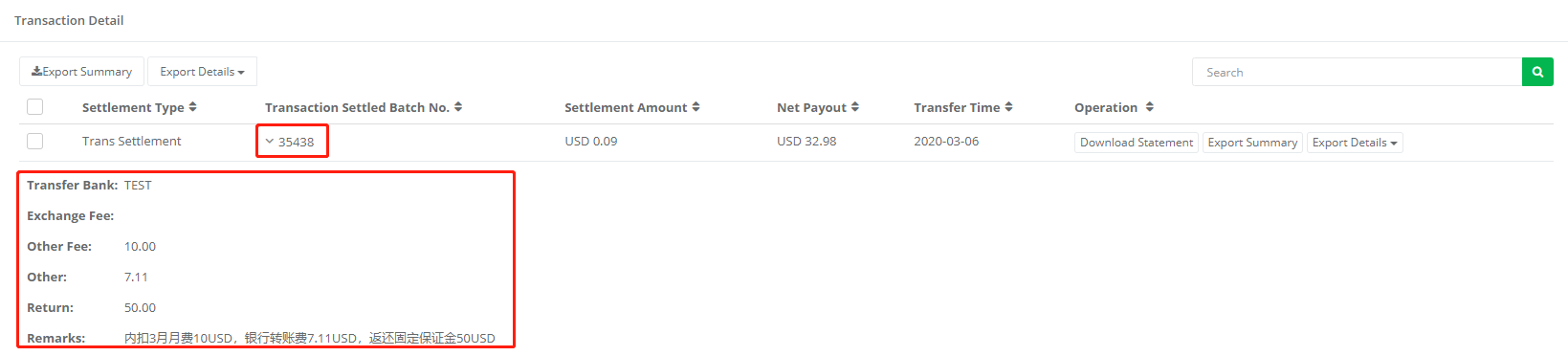
- Click the “Transaction Settled Batch No.” to display hidden information, view the OP transfer bank of the settlement, and additional remarks information.
Chapter 2 Reports
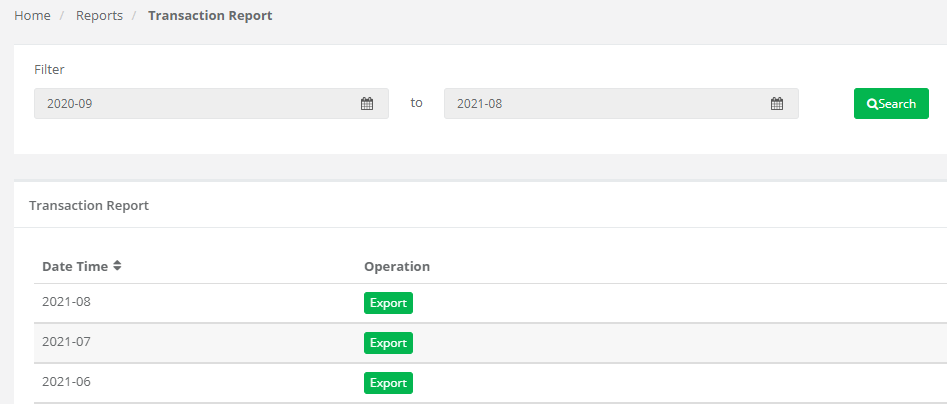
4. Transaction Report
The transaction report and amount data of the last month can be downloaded on the 1st day of each month. You can download the transaction report every first day of the month, the report can be used to statistic the transaction amount of previous month (Excel format, by payment method, transaction type, transaction currency, debit currency).
5. Monthly Report
The settlement monthly report of the previous month can be downloaded on the 1st day of each month, which is convenient for financial statistics.
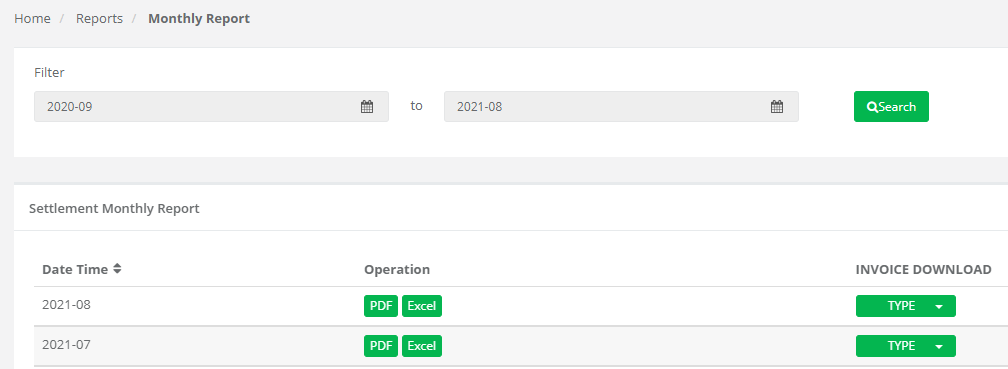
Download the settlement report by the required month.
6. Daily Report
You can view the previous day's account fund changes and balance on a daily basis, respectively: daily funding report, daily transaction report
- Daily Funding Report
-
Display daily opening balance,activity amount,settled amount and reserve funds, and remaining account funds by settlement currency.
-
Items description

-
Opending balance(Undeducted):The ending reserve of the corresponding currency in the preivous day
-
Activity Amount: Amount of new transactions added on the same day in this settlement currency
-
Settled Amount:The transaction amount of the on-day settlement batch in this settlement currency
-
Reserve: The amount of deduction from the on-day settlement batch minus the release reserve amount
-
Net Payout: The actual settled amount of this currency of the day
-
Ending Balance(Undeducted):opening balance minus activity amount-settled amount plus reserve
- Daily Transaction Report
-
Displaying the amount of daily changes in transactions by settlement
-
currency.
-
Item Description

-
Approved Transaction: Successful transaction amount of the day
-
Refund: Successful refund amount of the day
-
Chargeback: The amount of solved chargeback of the day
-
Retrieval: The amount of solved and canceled retrieval of the day
-
Successful Representment: The amount of solved successful re-presentment cases of the day
-
Total: The combine of the above 5 numbers
Chapter 3 Report and Statement Instruction
7. Statement
-
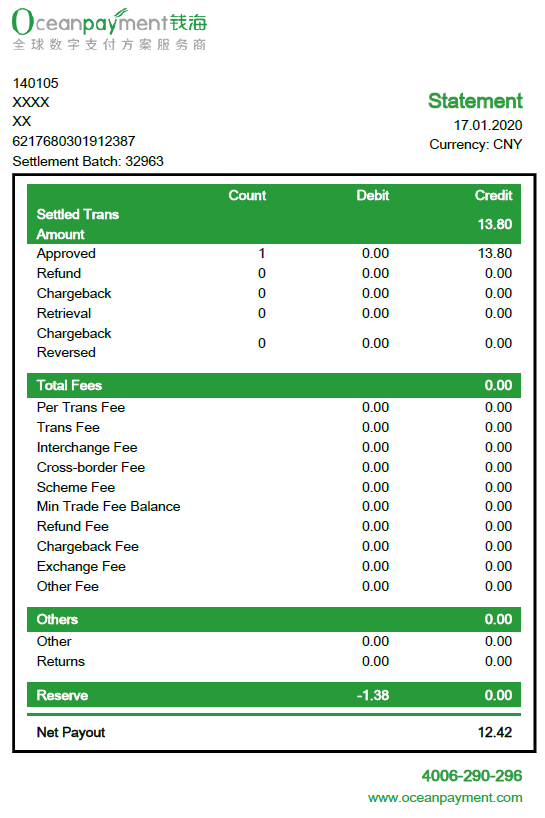
Sample:
-
Instruction:
- Settled Trans Amount: Settled transactions in this batch (including different transaction types, which are shown separately below).
- Total Fees: The fees deducted from this batch of settled orders, which are reflected in the settlement details for each order.
- Other Fee: Monthly fee, annual service fee, etc. will be reflected in this item, the details are descripted in the notes of the transfer.
- Others: Bank transfer fees, deposit, and other transfers are reflected in this item, the specific items are explained in the notes of the transfer.
- Reserve: Reserve and deposit withheld for this batch.
- Net Payout: Settled Trans Amount + Total Fees + Others + Reserve
8. Transaction Report
-
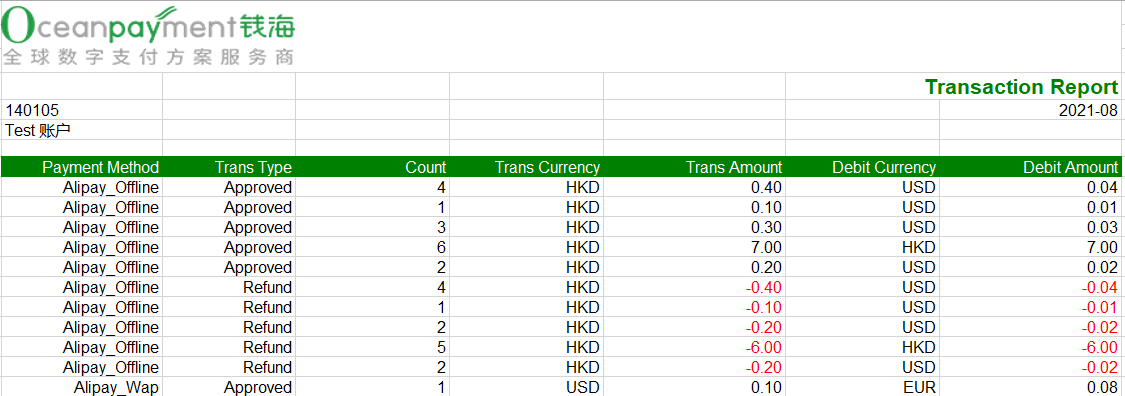
Sample:
-
Instruction:
- Time Period: All transaction details of debit time from day 1 to day 31 of the month.
- Total Amount: Same as “activity amount” of Settlement Monthly report.
- Can be statistics by different dimensions, such as payment method, transaction type, transaction currency, and debit currency.
- Chargeback Rate(Reference)
- Chargeback Ratio (Count) = Chargeback counts of this month/Approved counts of this month.
- Chargeback Ratio(Amount) = Chargeback amount of this month/Approved amount of this month, conversion based on the exchange rate on the 1st day of the following month, the data is only for reference.
- Refund Ratio(Reference)
- Refund Ratio (Count)= Refund counts of this month/Approved counts of this month.
- Refund Ratio(Amount)= Refund amount of this month/Approved amount of this month, conversion based on the exchange rate on the 1st day of the following month, the data is only for reference.
9. Monthly Report
-
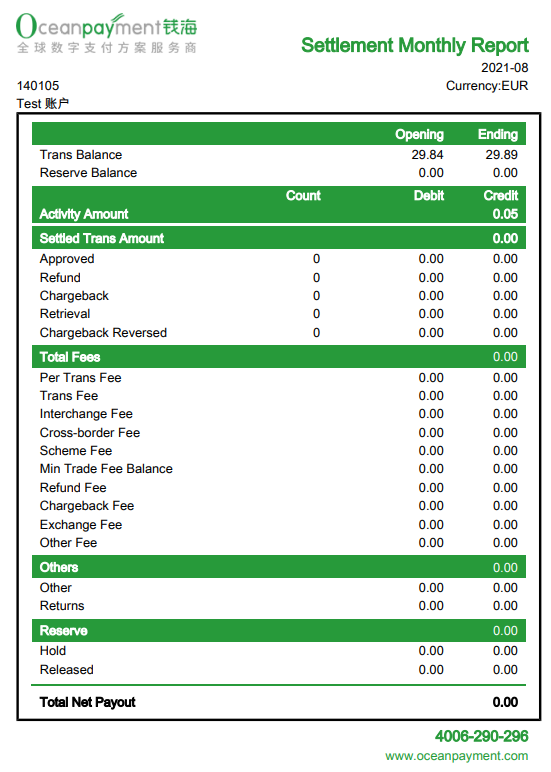
Sample:
-
Instruction:
-
Display by different settlement currencies in individual pages.
-
The current month can only download the report of the previous months.
-
Trans Balance/Reserve Balance: Trans balance/reserve balance that has not been settled at the end of the month.
-
Trans Balance: Opening of the period=Trans Balance of the end of last month.
Ending of the period=Opening of the period + activity amount - settled amount of this month.
-
Reserve Balance: Opening of the period = Reserve Balance of the end of last month.
Ending of the period = Opening of the period -withheld reserve of this month-released reserve of this month.
-
Activity Amount: All transactions of the month (debit time: debit amount from day 1 to day 31 of the month), which can compare with the amount of transaction report.
-
Settled Trans Amount: All settled transactions amount(all settled orders amount transfer time from day 1 to day 31 of the month)
-
Fees: All deduction of transactions have settled of this month (including all settlement batches of the month, refer to the notes for each batch).
-
Others: Including all others and rebate funds from the month's settlement batches, check out the notes for each batch.
-
Reserve = reserve balance of this month + released reserve of this month. Hold: Reserve held from settled trans amount of this month.
Released: Reserve released from settlement this month.
-
Total Net Payout: total settlement trans amount + total reserve amount.