All Exceptions Guidelines
1. Chargeback
1.1 What is Chargeback
A chargeback is the reversal of financial transaction, typically initiated by a customer (the cardholder), who disputes a sale on his or her credit card.)Generally occurring within 180 days after the transaction, some industries and issuers can accept chargeback applications for a longer period of time. When a chargeback occurs, merchants can submit re-presentment before the reply deadline if they do not agree with the chargeback. And if merchants win the re-presentment, fund will back to the merchant's account. Besides, please note that regardless of whether the appeal is successful or not, the bank will charge a chargeback fee.
1.2 Chargeback Reasons
| 拒付原因 | Chargeback Reasons | Chargeback reason categories |
|---|---|---|
| 欺诈交易 | Other Fraud-Card Absent Environment | Allocation |
| 触发伪冒监控程序 | Visa Fraud Monitoring Program | Allocation |
| 持卡人未授权 | No Authorisation | Allocation |
| 交易清算延迟 | Late Presentment | Collaboration |
| 错误交易代码 | Incorrect Transaction Code | Collaboration |
| 错误交易币种 | Incorrect Currency | Collaboration |
| 错误账户 | Incorrect Account Number | Collaboration |
| 错误交易金额 | Incorrect Amount | Collaboration |
| 重复处理 | Duplicate Processing | Collaboration |
| 已用其他方式支付 | Paid by Other Means | Collaboration |
| 无效数据 | Invalid Data | Collaboration |
| 服务未提供或未收到商品 | Merchandise/Services Not Received | Collaboration |
| 未收到退款 | Credit Not Processed | Collaboration |
| 已取消的循环交易 | Cancelled Recurring | Collaboration |
| 货物损坏/货不对版 | Not as Described or Defective Merchandise/Services | Collaboration |
| 虚假商品 | Counterfeit Merchandise | Collaboration |
| 虚假描述 | Misrepresentation | Collaboration |
| 已取消的商品/服务 | Cancelled Merchandise/Services | Collaboration |
| 其他 | Others | |
| 持卡人无法识别交易 | Cardholder Does Not Recognize the Transaction | |
| 调单请求不清晰/理由不充分 | Request for support illegible/insufficient | |
| 无效授权 | Invalid Authorisation | |
| 费用存在疑义 | Car Rental Charge non qualified or unsubstantiated | |
| 重复处理/已用其他方式支付 | Duplicate Processing/Paid by Other Means | Collaboration |
| 授权问题拒付 | Authorization-Related Chargeback | |
| 持卡人争议 | Cardholder Disputes |
2. Introduction to Chargeback Functions
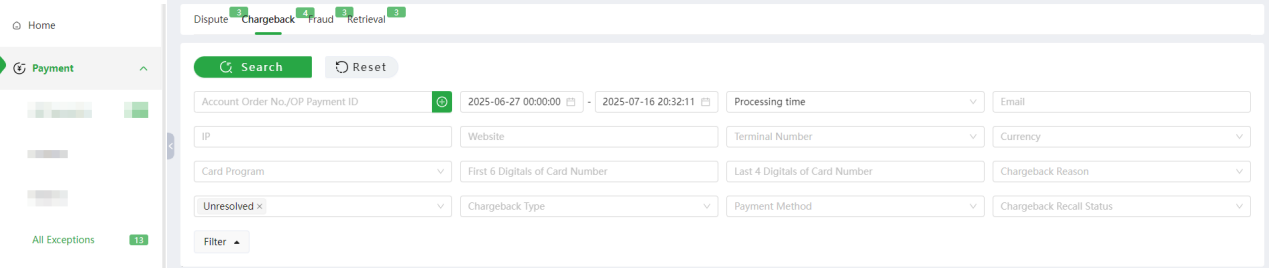
Click [Payment] - [All Exceptions] - [Chargeback], Merchant can search for chargeback transaction details using the account order number or payment ID. Merchant can also filter chargeback transaction details by transaction time, chargeback time, response deadline, processing time, chargeback reason, chargeback status, and chargeback recall status.
2.1 Search
Time: default processing time, optional time conditions are transaction time, chargeback time, response deadline, processing time
-
Transaction Time: Refers to the timestamp when the transaction enters the Oceanpayment payment system.
-
Chargeback Time: Equivalent to the Chargeback Processing Date (CPD), indicating the date when the consumer filed a dispute with the issuing bank and the bank processed the chargeback.
-
Response Deadline: The final date by which merchants must submit a representment to the chargeback. If no response is submitted by the deadline, it will be deemed that the merchant accepts the chargeback and waives the right to dispute.
-
Processing Time: Refers to the processing timestamp of the transaction's latest status, including the review time for chargebacks and the review time for representment.
-
Merchant Processing Time: The time for merchants to process chargeback transactions. e.g., when a merchant submits a Re-presentment or accepts a chargeback.
Chargeback Reason includes Other Fraud-Card Absent Environment, Merchandise/ Services Not Received,Not as Described or Defective Merchandise/Services, etc. Please submit re-presentment information for transaction with different chargeback reasons under the guidance of Oceanpayment backend.
2.2 Chargeback Status
The processing status of this transaction
-
Unresolved: Orders that support re-presentment submission within the response deadline but have not yet initiated re-presentment.
-
Re-presentment: Orders for which re-presentment has been submitted.
-
Successful re-presentment: The final re-presentment result is successful and the chargeback amount will be returned to the merchant.
-
Failed: The final re-presentment result is failed.
-
Accepted: Orders that have submitted "Accept Chargeback" in the background; orders that support re-presentment submission but have not initiated re-presentment within the response deadline.
-
No response required: The chargeback amount is 0; or when the chargeback is updated, the response deadline has expired (i.e., chargeback orders that do not support re-presentment).
2.3 Chargeback Type
Chargeback Type: Chargeback, RDR, Klarna CT, Dispute, RDR third party, Ethoca, Other, Chargeback Gateway.
-
Chargeback: Chargeback transaction
-
RDR: Chargeback alert transaction
-
Klarna CT: Klarna chargeback early warning transaction
-
Dispute: Afterpay chargeback transaction
-
RDR third party: Third party chargeback early warning transaction
-
Ethoca: Mastercard chargeback early warning transaction
-
Other: Transactions deducted in other ways, not chargeback orders
-
Chargeback Gateway: Gateway model payment product, chargeback notified by the bank for transactions not settled by OP
2.4 Initiate Re-presentment
This indicates that the merchant disputes the chargeback filed by the cardholder or the issuing bank with the card network. The merchant must submit representment materials to the bank to demonstrate that the cardholder’s dispute is invalid, thereby reclaiming the chargeback amount.
- Process to Initiate a Re-presentment: In the [Chargeback] module, search for the corresponding chargeback transaction record using relevant filter criteria. Click on the transaction record to expand and view its detailed information, as shown below:
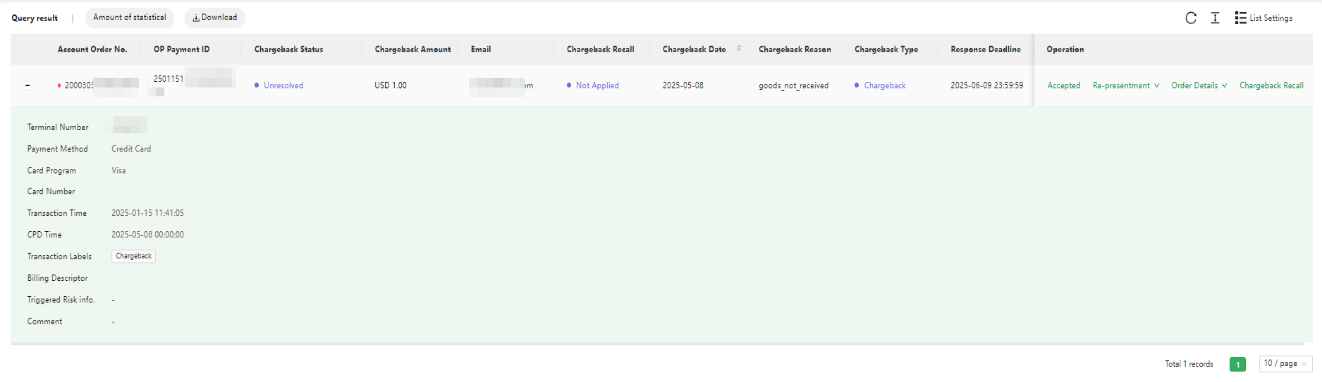
- As shown in the picture above, the chargeback reason is "Merchandise/Services Not Received". The client paid this transaction on 2025-01-15, and initiated a chargeback on 2025-05-08. The response deadline is 2025-06-09, which means the merchant can click [Accepted] or [Re-presentment] before 2025-06-09. If the merchant does not accept this chargeback, click [Re-presentment] to submit information proving that the cardholder's dispute is invalid. Click [Re-presentment] to go to the editing page.
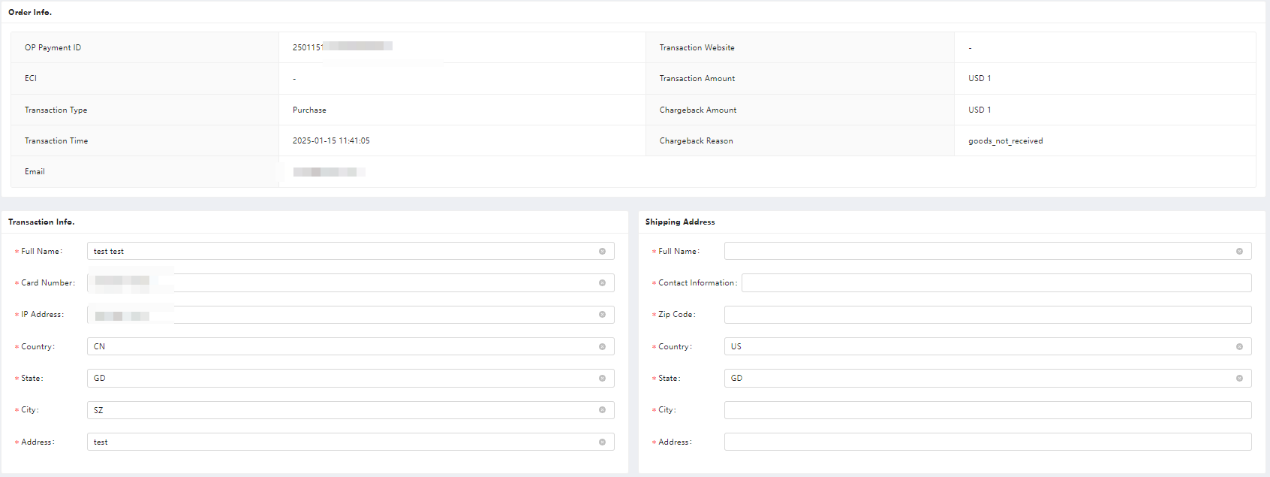
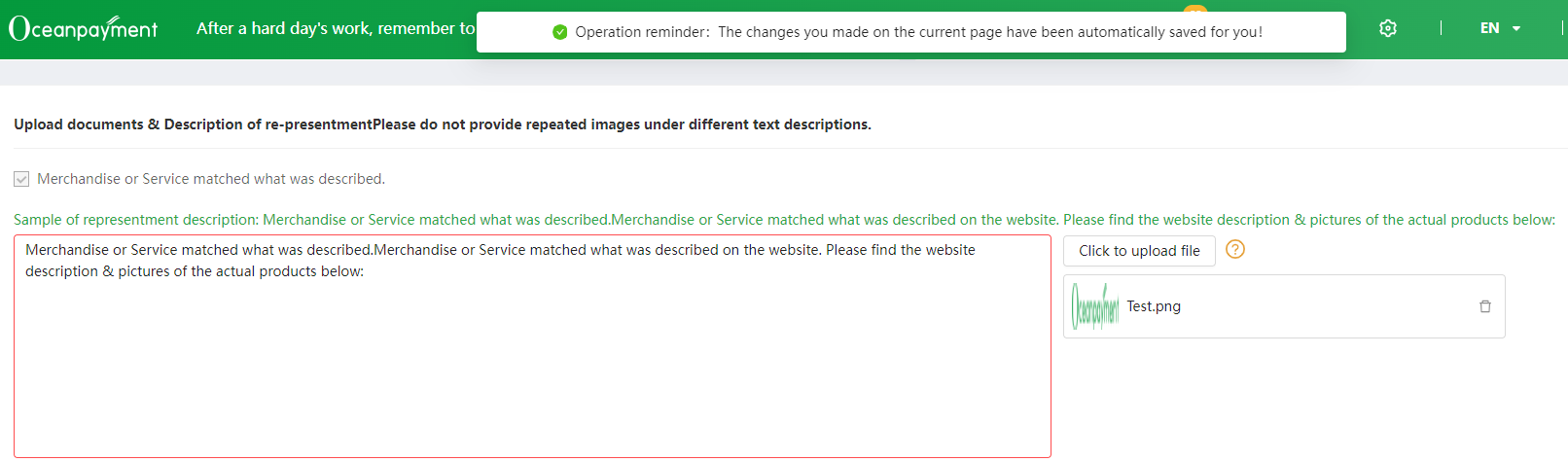
- The re-presentment page has auto-synchronized the original information of the order, and merchants can edit the order information or receipt information on this page. Meanwhile, the system will display the corresponding information items for different chargeback reasons, and samples of re-presentment description as well. Double-click the green font above can be auto-synchronized to the text box. Uploaded files can be previewed by clicking. The system automatically saves drafts every 1 minute. After clicking [Submit], merchants can preview the re-presentment documents.
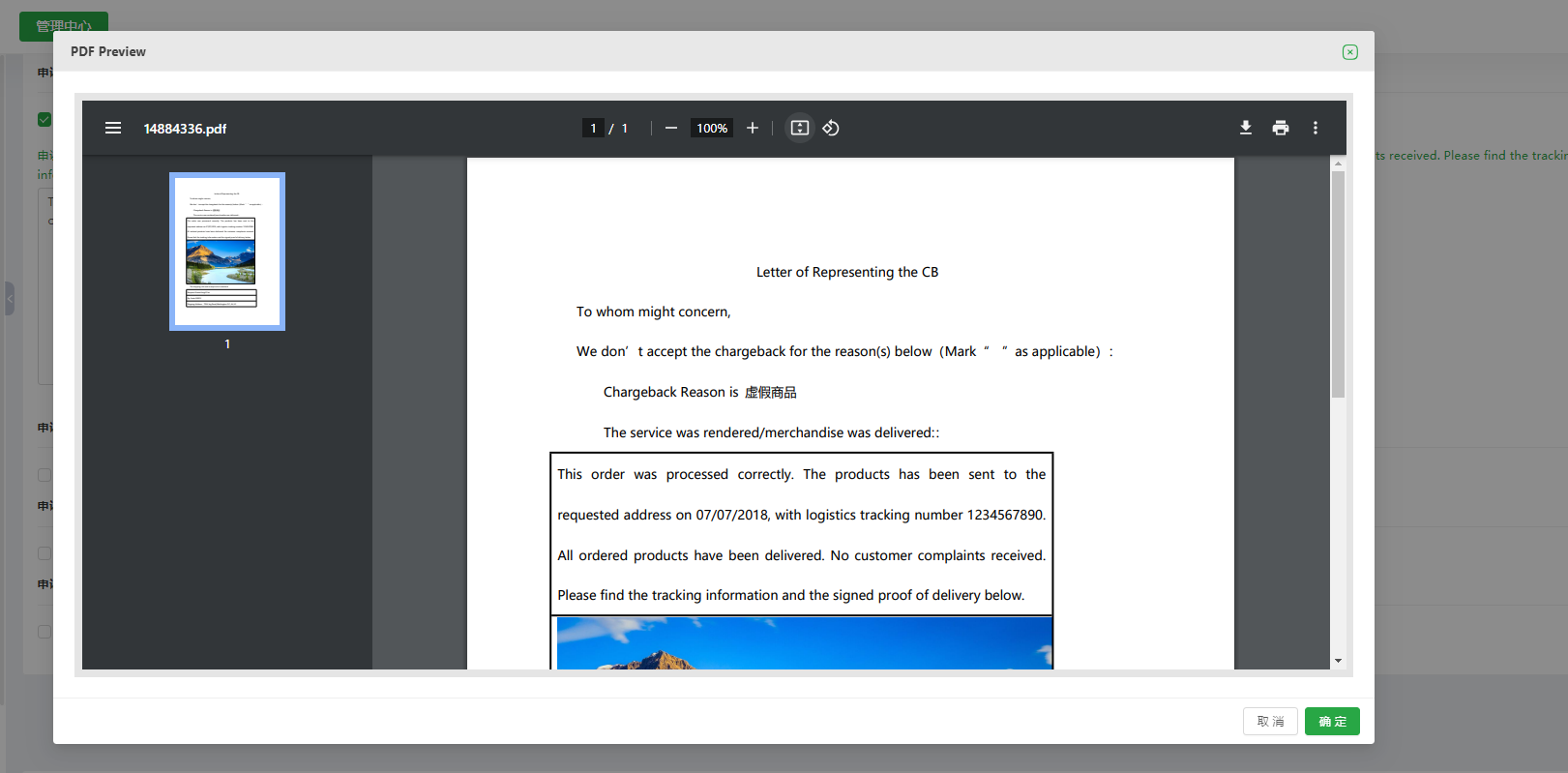
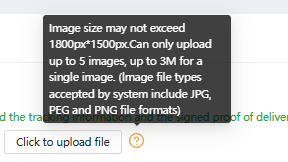
4.The re-presentment submission requires that the supporting documents be in English, and the supporting materials must be images. You can provide 1 to 5 images. The images should be clear and support JPG, JPEG, PNG, and other image formats. Each image should be controlled within 3MB, and the image size must not exceed 1800px*1500px.
2.4.1 Batch Representment
Feature Overview:The bulk representment feature addresses merchants' customized requirements for representment materials, enabling them to independently define the layout and content of representment documents. Simultaneously, batch operations enhance the merchant experience by streamlining the process and reducing the complexity of multi-step procedures.
The Difference Between Batch Representments and Initiating Representments:
Initiate a Re-presentment:To submit a representment for a chargeback order, click “Re-representment” under the chargeback order to access the designated representment submission page. Edit the text in the system-provided fields and upload supporting documentation.
Batch Representment:This is the functional button for the chargeback transaction section, enabling merchants to submit representment materials for multiple payment IDs. It also reduces system restrictions, allowing merchants to customize and edit representment documents. Batch representments and individual representments are both methods for submitting representment materials, but the final representment outcome remains subject to the bank's decision.
Batch Representments Guidelines:
To ensure representment documents are accurately matched to the chargeback orders requiring representment, follow the representment instructions. If the following conditions are met, you may submit a batch representment request.
-
Before uploading files, compress them into ZIP format.
-
The compressed file naming format must be:Representment-YYYYMMDD.zip
-
Within the compressed file, representment documents must be named using the payment ID, with a maximum of 1000 characters.
-
Duplicate payment ID representment submissions are not supported. If two payments with identical payment IDs require representment, only a single submission is permitted.
-
For document formatting requirements, please refer to the sample document.
-
After submission, if the corresponding payment ID's chargeback status changes to “Re-presentment”, it indicates that the document upload was successful.
-
After successful upload, click “Download Voucher”to preview the representment document.
For more details, please refer to the Oceanpayment Merchant Portal - Help Center: 【Merchant Batch Representment Submission Guide】 Instructions and Precautions: In the following scenarios, Visa and MC may levy a technical violation fee, and it is necessary to redact sensitive information.
-
In the event that representment materials include documents such as personal identification cards, passports, Visa cards, or other documents that contain personal identity information, these documents need to be redacted for the protection of sensitive data.
-
Visa charges a technical violation fee of 250.00 EUR per violation.
-
MasterCard charges a technical violation fee of 200.00 EUR per violation.
2.5 Accept Chargeback
Accepting the chargeback indicates that you agree to this chargeback order, and do not submit the re-presentment information, the bank will deduct the corresponding chargeback amount of the transaction.
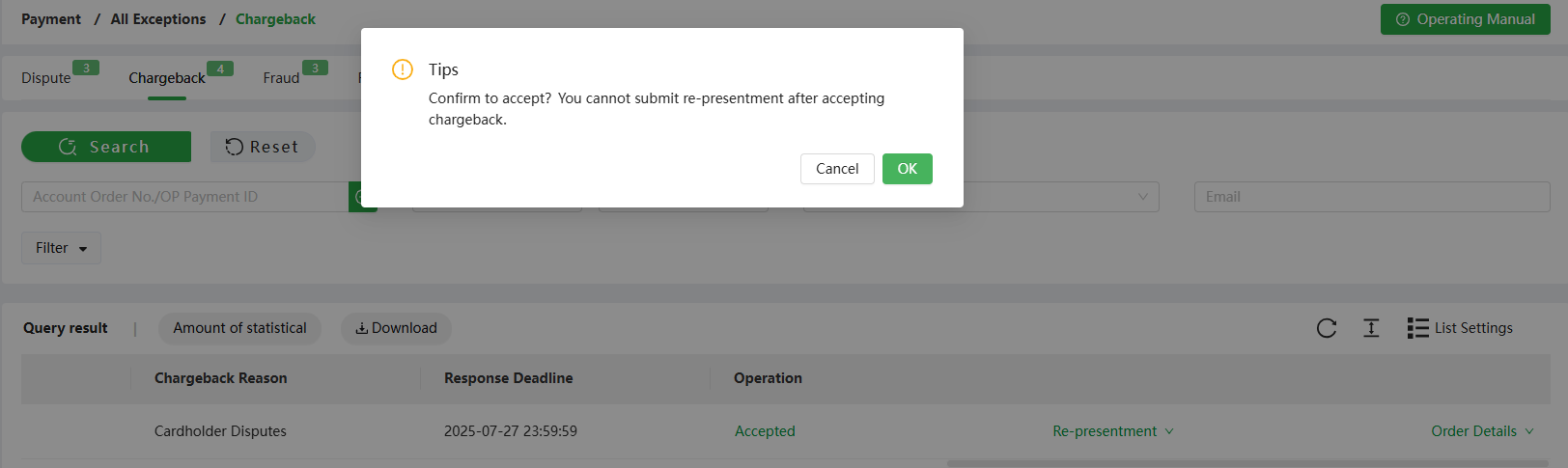
The following figure shows that the response deadline for this transaction is 2025-07-27 23:59:59, if you accept this chargeback transaction, click [Accepted] before the response deadline. Once clicked, you cannot Initiate [Re-presentment]. If the deadline has passed, the system will automatically default to [Accept Chargeback], and no further [Re-presentment] will be allowed.
2.6 Unresolved Alerts
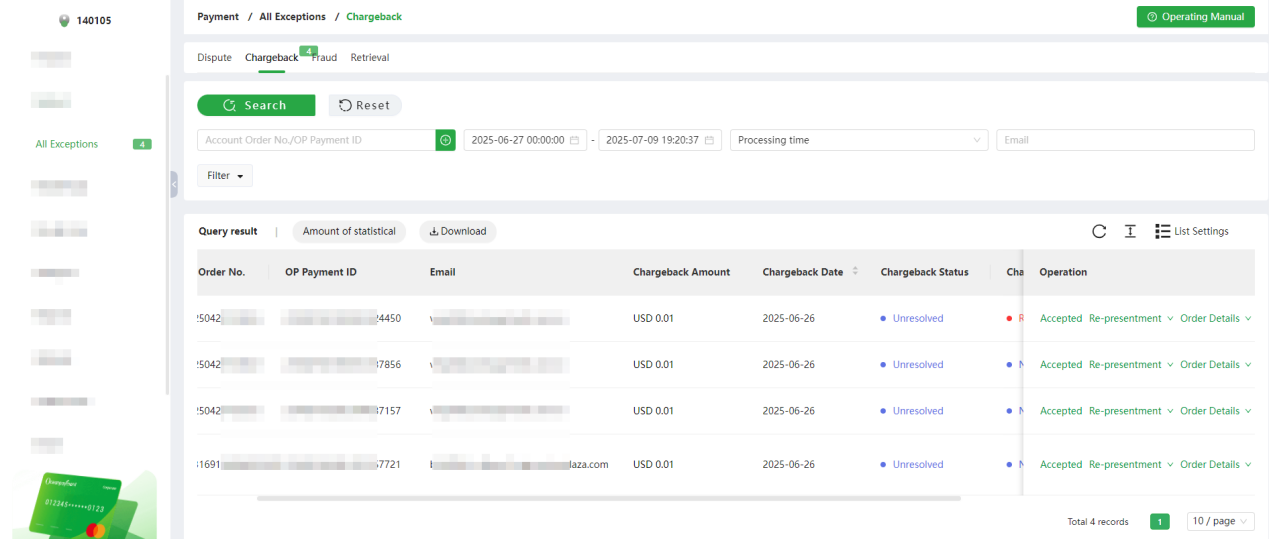
-
As shown in [Chargeback] above, you can view all orders in the [Chargeback] module with an [Unresolved] status. These are orders where a representment submission is still allowed within the Response Deadline, but no representment has been initiated yet. Merchants should prioritize processing Unresolved orders with Response Deadlines approaching expiration.
-
After reselecting criteria in the [Filter], click [Search] to query data based on the updated filter conditions.
2.7 Download
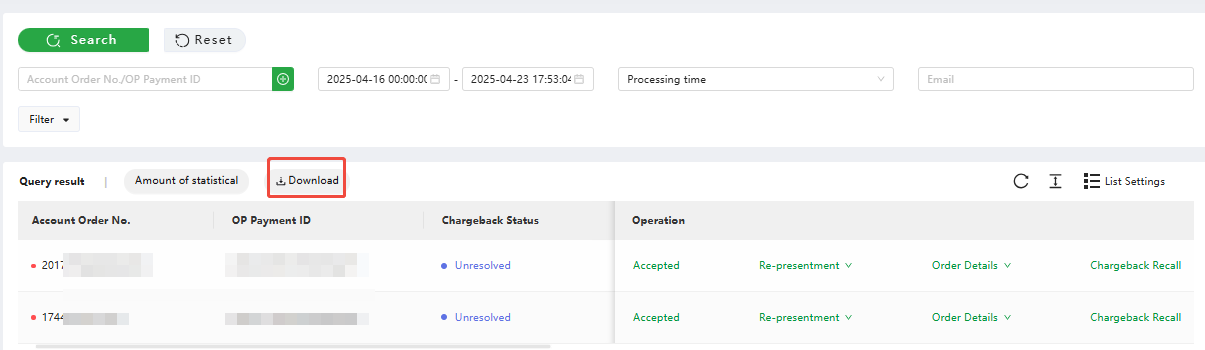
Click [Download] to download the queried results.
2.8 Order Details
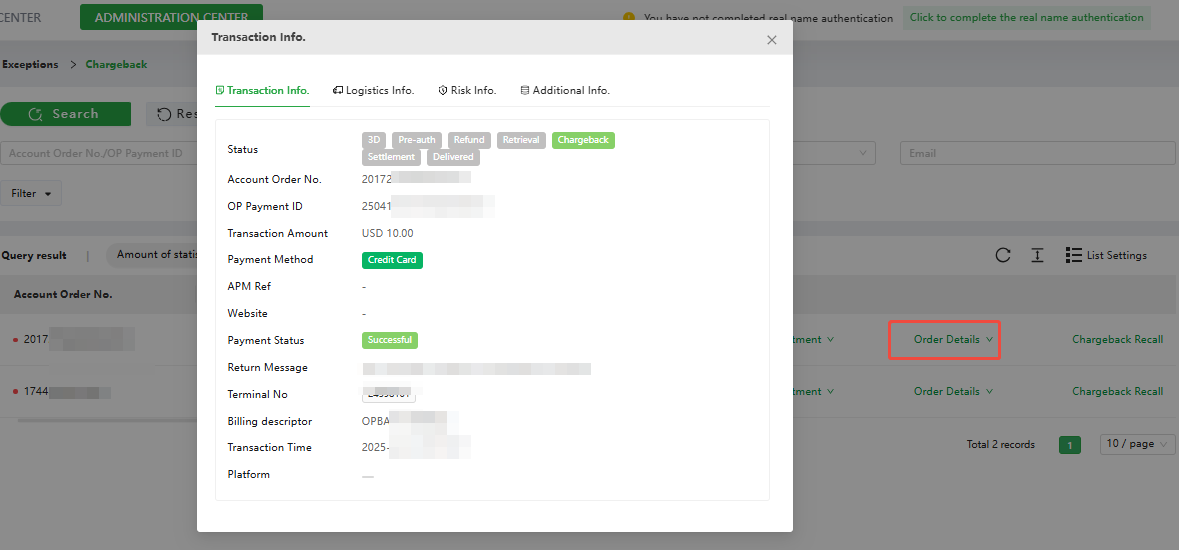
Click [Order Details] to view this transaction information, logistics information, risk information, and additional information.
2.9 Chargeback Recall
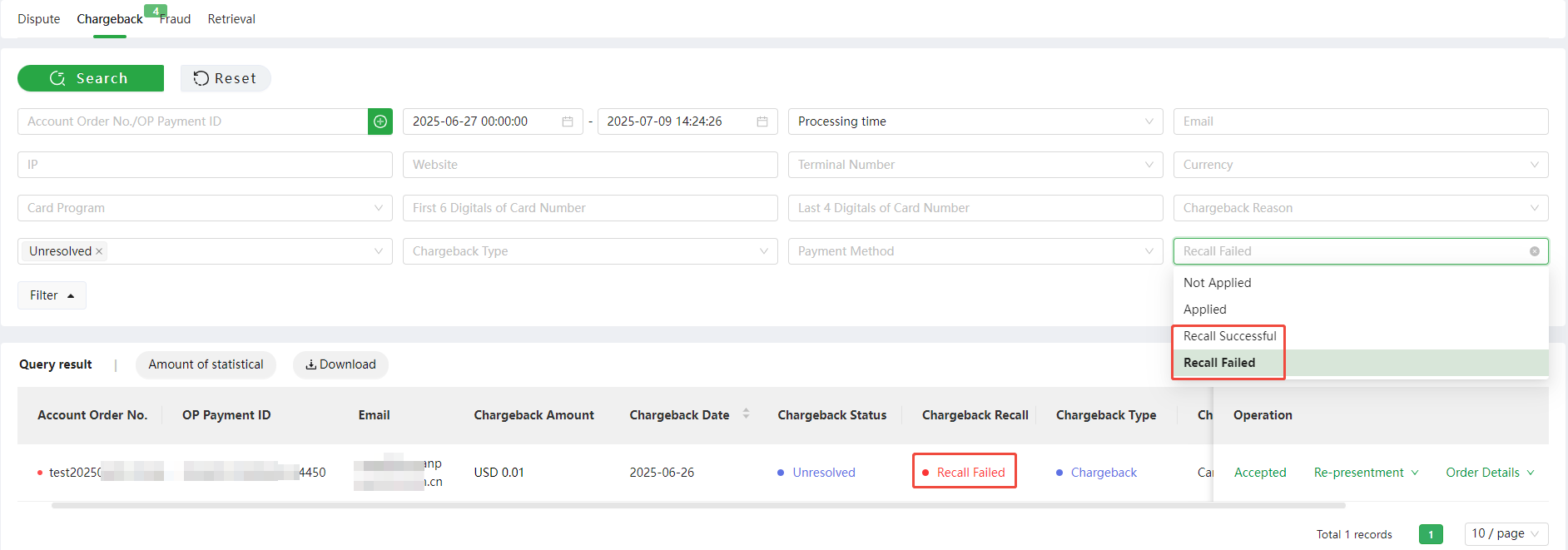
Chargeback Recall Status Filter: Not Applied, Applied, Recall Successful, Recall Failed
Difference between Chargeback Recall and Re-presentment:
-
Chargeback Re-presentment: The merchant disputes the chargeback, providing evidence to prove the chargeback is invalid or unreasonable. The final decision rests with the issuing bank.
-
Chargeback Recall: The consumer proactively cancels the chargeback with the issuing bank and agrees to return the funds. The merchant must provide relevant withdrawal documentation for the acquirer to confirm the chargeback status with the issuing bank.
Conditions for Initiating a Chargeback Recall:
Depending on the chargeback processes of different card networks, the Chargeback Recall request is not universally applicable to all orders. A Chargeback Recall request can only be initiated if all the following conditions are met. If the conditions are not satisfied, the Chargeback Recall button will remain hidden.
-
Payment method: Credit Card, GooglePay, ApplePay
-
Chargeback amount > 0
-
Chargeback type = "Chargeback"
-
Chargeback status = "Unresolved" or "No Response Required"
-
Within 15 days from the chargeback date
-
Chargeback recall status = "Not Applied" or at least 7 days have passed since the last recall failed result
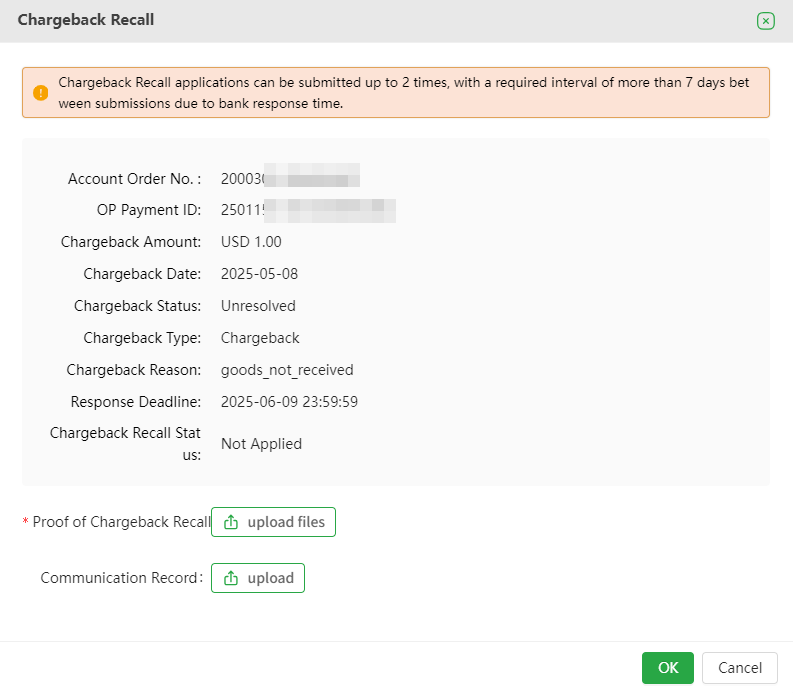
As shown in the figure, click [Chargeback Recall] to access the chargeback recall proof submission page.

Chargeback Recall Request Initiation:
-
Chargeback Recall Status Filter = Not Applied
-
Click the order dropdown details, select "Chargeback Recall", and enter the Submit Recall Documentation page.
-
Recall Documentation (Required): Supports doc, docx, pdf, jpg, jpeg.
-
Communication Records (Optional): Supports doc, docx, pdf, jpg, jpeg.
-
File Restrictions: Single file size limit 3MB; up to 5 files allowed.
-
Initiation Time: Must be submitted within 15 days of the chargeback date.
-
Submission Frequency: Maximum of 2 submissions, with at least 7 days between submissions.
-
Transaction Limit: Single transaction only; batch submissions not supported.
Chargeback Recall Result Feedback:
-
Feedback Time: Within 5 business days.
-
Recall Failed: Consumer did not withdraw the chargeback; status remains unchanged (can resubmit after 7 days).
-
Recall Successful: Consumer withdrew the chargeback; funds returned via representment successful status.
3. Retrieval Request
3.1 What is Retrieval Request
-
When cardholders are unsure whether a transaction on the issuer's statement was made by themselves, they usually request a copy of the relevant transaction document from their card issuer to determine whether the transaction was made by them. The above behavior is called retrieval.
-
After the retrieval request occurs, the issuer freezes the transaction amount and waits for further verification before deciding whether to unfreeze it. If the fund of the transaction is frozen, the settlement of this transaction will be postponed.
-
If the retrieval request does not escalate to a chargeback, the transaction funds will generally be released 180 days after the transaction. However, in certain industries or with specific issuing banks, funds may remain frozen for a longer period.
3.2 Retrieval Request Reasons
| 调单原因 | Retrieval Request Reasons |
|---|---|
| 欺诈交易 | Other Fraud-Card Absent Environment |
| 触发伪冒监控程序 | Visa Fraud Monitoring Program |
| 持卡人未授权 | No Authorization |
| 交易清算延迟 | Late Presentment |
| 错误交易代码 | Incorrect Transaction Code |
| 错误交易币种 | Incorrect Currency |
| 错误账户 | Incorrect Account Number |
| 错误交易金额 | Incorrect Amount |
| 重复处理/已用其他方式支付 | Duplicate Processing/Paid by Other Means |
| 无效数据 | Invalid Data |
| 服务未提供或未收到商品 | Merchandise/Services Not Received |
| 已取消的循环交易 | Cancelled Recurring |
| 货物损坏/货不对版 | Not as Described or Defective Merchandise/Services |
| 虚假商品 | Counterfeit Merchandise |
| 虚假描述 | Misrepresentation |
| 未收到退款 | Credit Not Processed |
| 已取消的商品/服务 | Cancelled Merchandise/Services |
| 其他 | Others |
4. Introduction to Retrieval Functions
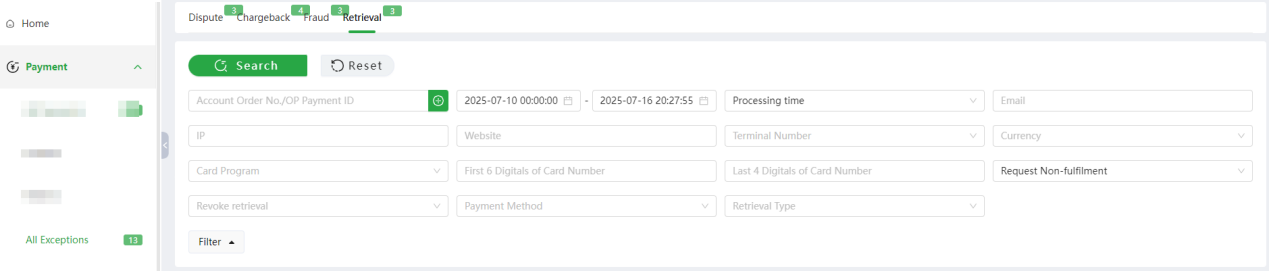
Click [Payment] - [All Exceptions] - [Retrieval], Merchants can query the corresponding retrieval transaction information according to Account Order No. or OP Payment ID. Orders can also be filtered by Transaction Time, Retrieval Time, Response Deadline, Processing Time, Retrieval Status, etc.
4.1 Search
- Time:** **Default Process Time
-
Transaction Time: When this transaction occurred
-
Retrieval Time: When this transaction was retrieval
-
Response Deadline: The deadline for submitting retrieval response letter for this transaction
-
Process Time: Time for this transaction to be processed by Oceanpayment
-
Merchant Processing Time: The time for merchants to process retrieval transactions, e.g., when a merchant submits a Re-presentment or accepts a refund
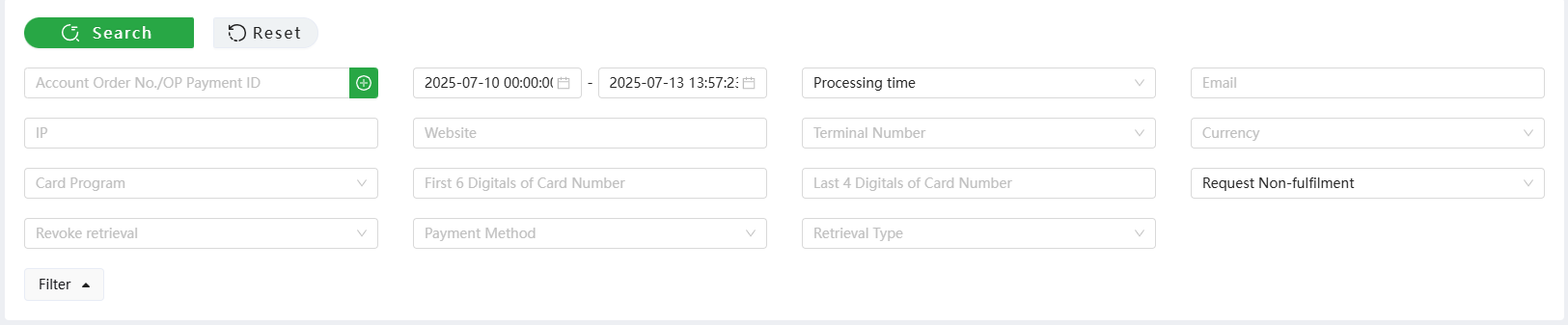
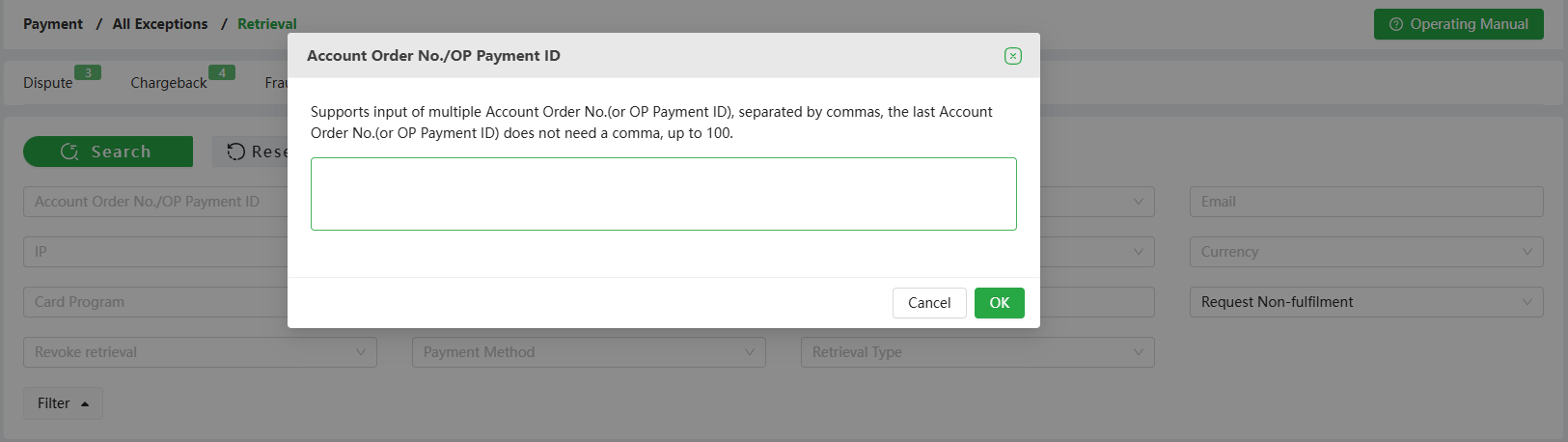
- Account order number/Payment ID: You can enter the Account Order Number, or Payment ID to search
-
You can enter multiple Account Order Numbers or multiple Payment IDs via [red box +]
-
Either enter the Account Order Number or Payment ID at the same time; do not enter the Account Order Number and Payment ID at the same time
-
Multiple Account Order Numbers (or multiple Payment IDs) must be separated by [English format commas]
- Status: Check the processing status of the retrieval order
-
Request Fulfilment: This transaction has been submitted with [Retrieval Response] material in the backend
-
Request Non-Fulfilment: This transaction has not been submitted with [Retrieval Response] material in the backend
-
Unprocessed: The retrieval amount is 0; or the response deadline has expired when the retrieval order is updated (i.e., retrieval orders that do not need to be processed, mainly Klarna's retrieval data)
-
Refunded: This transaction has a refund record

-
Terminal Number: Multiple selections, allows for searching multiple terminal numbers
-
E-mail: Case insensitive, accurate search
-
Payment method: Option to select multiple payment methods at the same time
-
Revoke retrieval: YES/NO
-
Retrieval Type:
-
Retrieval : Transaction retrieval for consumer dispute
-
Dispute: Transaction complaint by consumer
-
Inquiry: Order inquiry triggered by monitoring

4.2 Unresolved Reminder
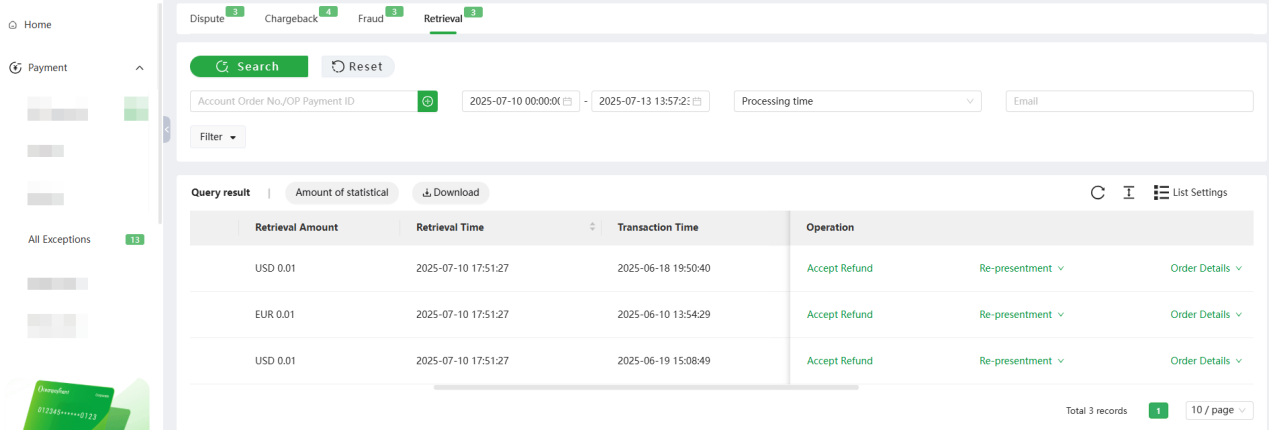
-
As shown in the [Retrieval] section above, you can view all orders under the [Retrieval] section with statuses: Request Non-Fulfilment and Not Refunded.
-
Time Range: From the current time to the earliest date of unresolved orders.
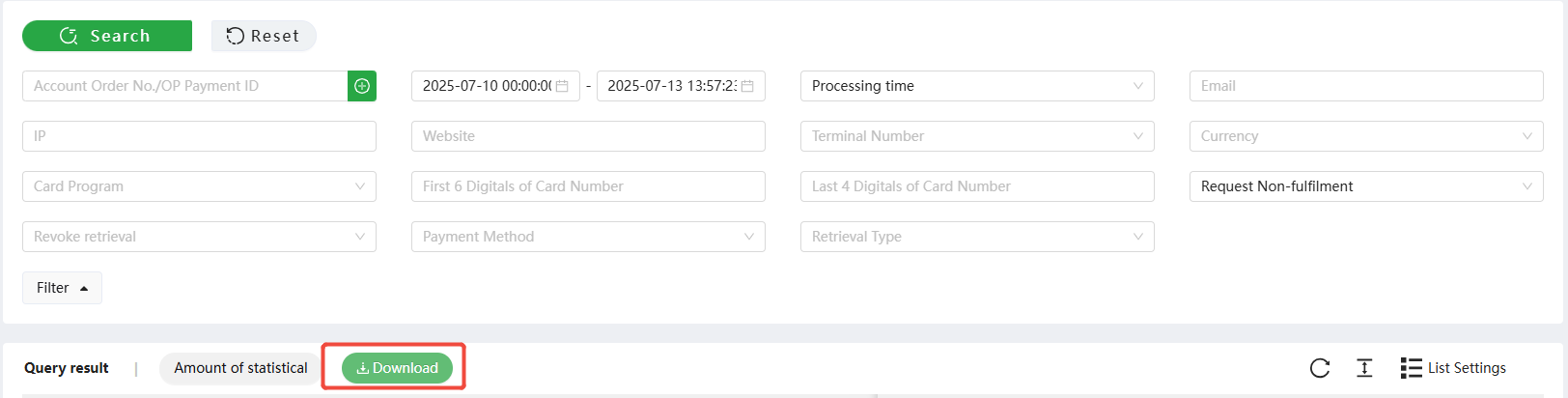
4.3 Download
1.Click [Download], you can download the search result
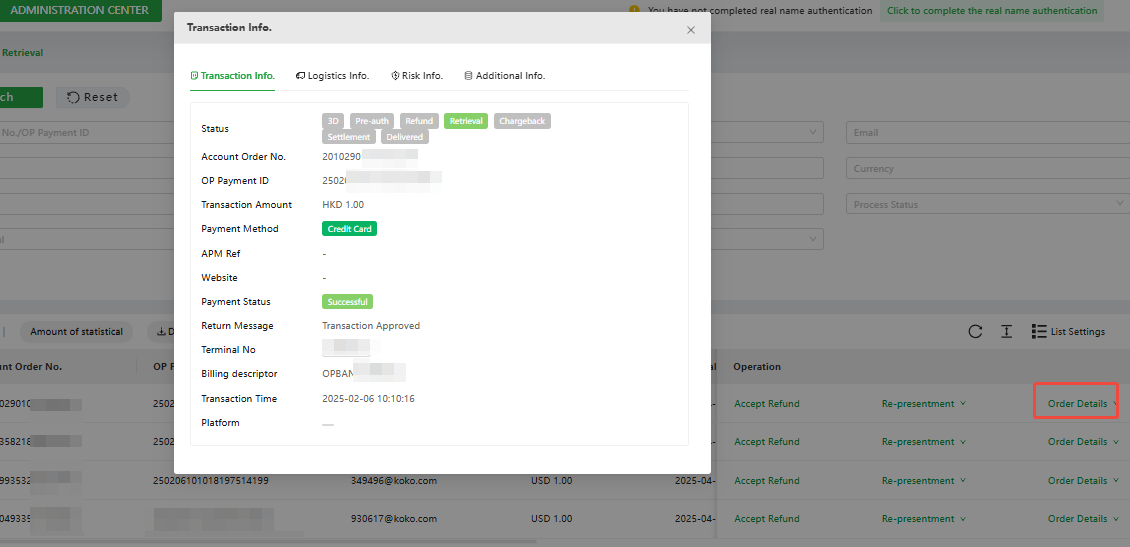
4.4 Order Details
- Click [Order Details] to view this transaction information, logistics information, risk information, and additional information.
4.5 Accept Refund
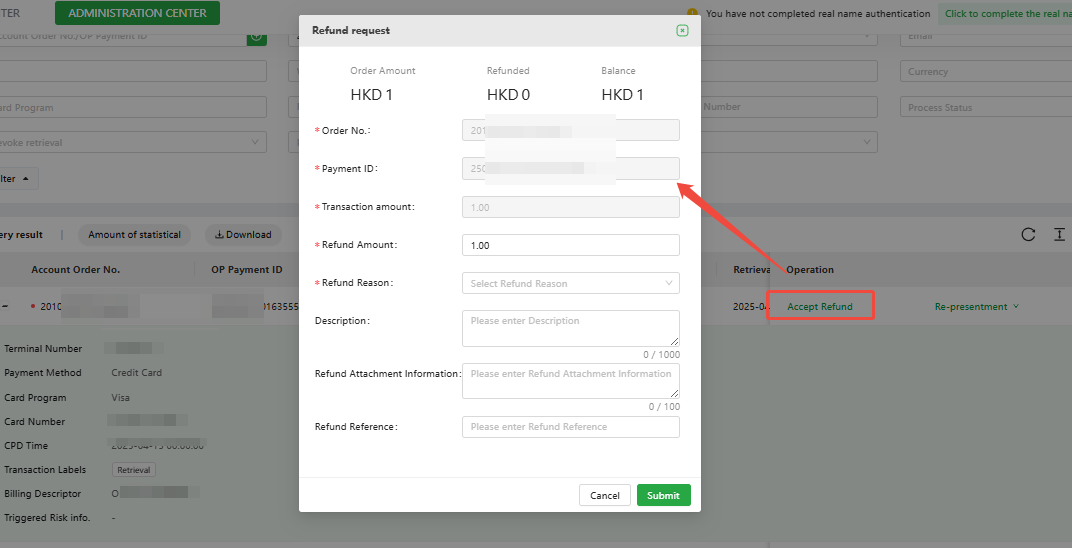
- Accept Refund: Indicates acceptance of this retrieval request; the refund will be processed directly by the bank.
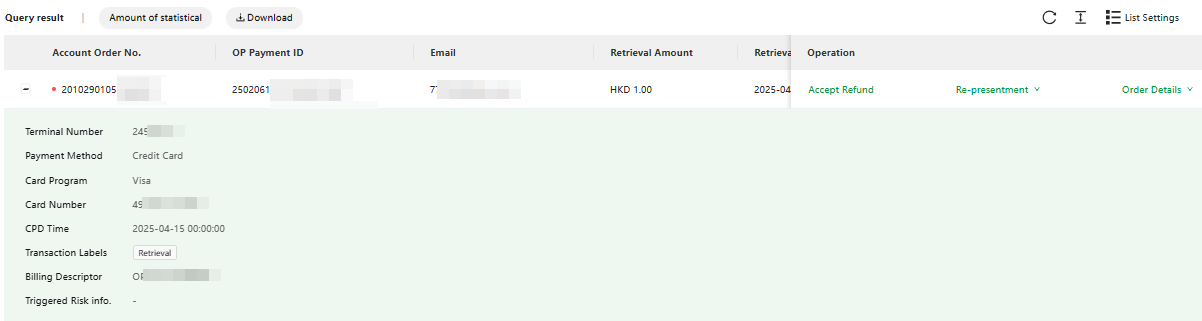
- Click [Accept Refund] to automatically display the refund page with the current order details. You may process either a full refund or a partial refund.
-
As shown above: To accept the refund, click [Accept Refund] to refund the transaction. [Accept Refund] is not restricted by the response deadline; even if the response deadline is exceeded, the retrieval transaction can still be refunded.
-
If before the response deadline: neither [Accept Refund] nor [Retrieval Response] has been submitted, the order will be accepted by default. There may be a risk of chargeback. If a chargeback occurs, in addition to deducting the transaction amount, the bank will also need to charge an additional chargeback processing fee.
-
If the retrieval is not processed in time, Amex will directly upgrade it to a chargeback order; merchants need to process the retrieval in time to avoid chargeback.
-
If the retrieval is not processed in time, Discover will no longer support the submission of chargeback representment if a chargeback occurs; merchants need to process the retrieval in time to avoid chargeback.
-
For Discover retrieval requests, Accept Refund must be processed within 30 days of the retrieval request initiation. Accept Refund is not supported after 30 days.
4.6 Retrieval Response
Retrieval response: Submit the documents related to the retrieval order to the bank to
fulfil the retrieval request, thereby applying for cancellation of the retrieval.

- Click [Re-presentment] to go to the editing page.
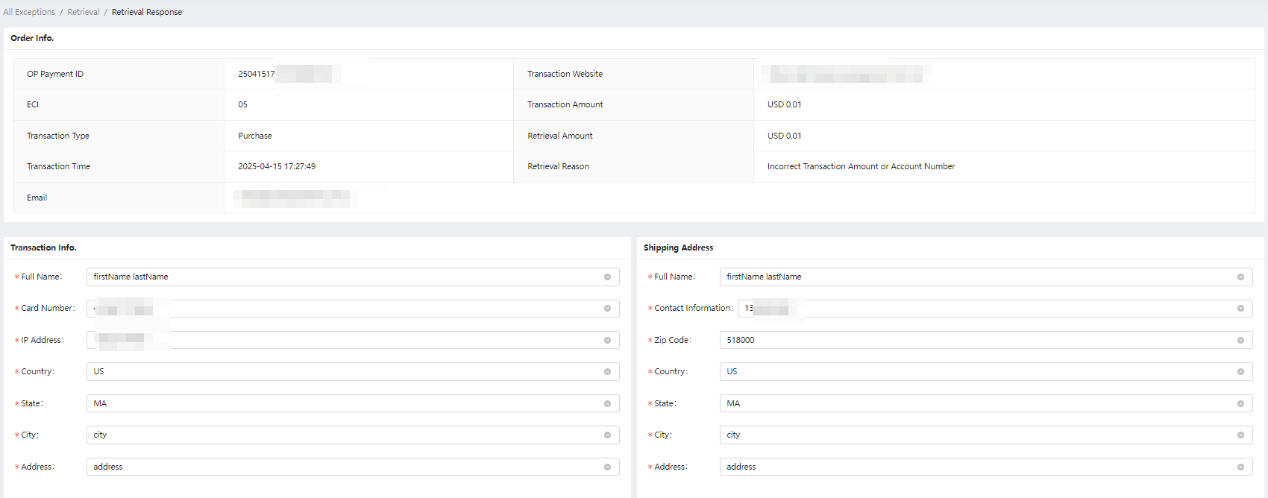
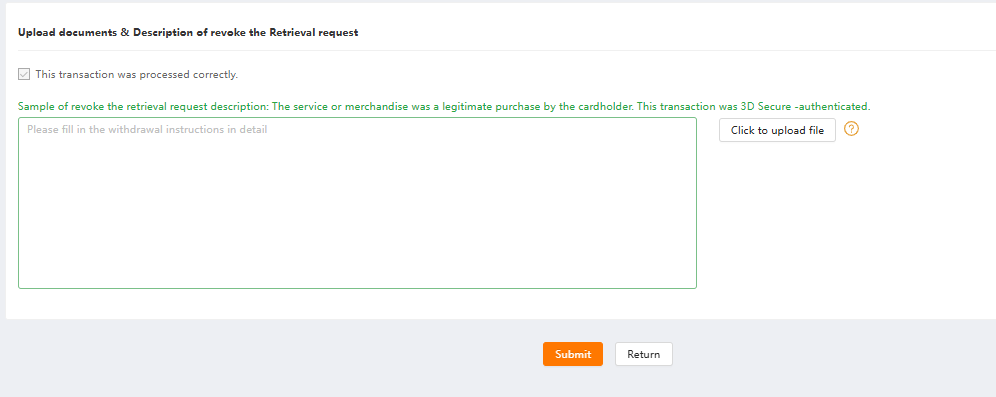
- According to the retrieval reasons, select the corresponding retrieval materials.
-
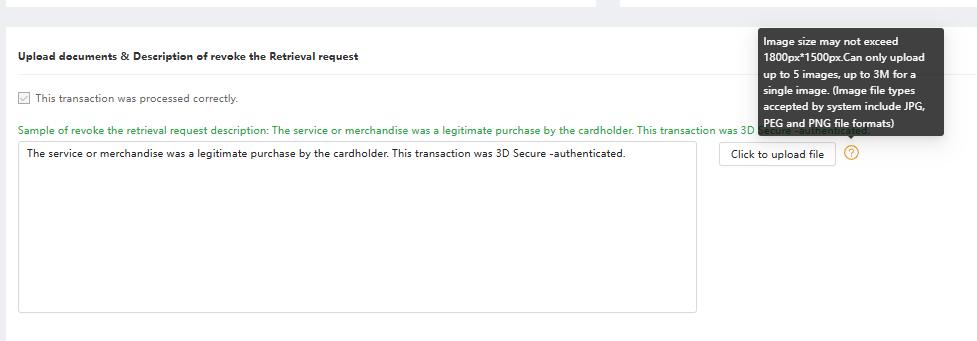
When the cursor clicks on the example, the text description of revoke the retrieval request is automatically obtained, and the example text is supplemented.
-
Upload proof documents: Up to 5 images can be uploaded. Supported image formats include JPG, JPEG, and PNG. The maximum size for each image is 3MB, and the image dimensions should not exceed 1800px*1500px.
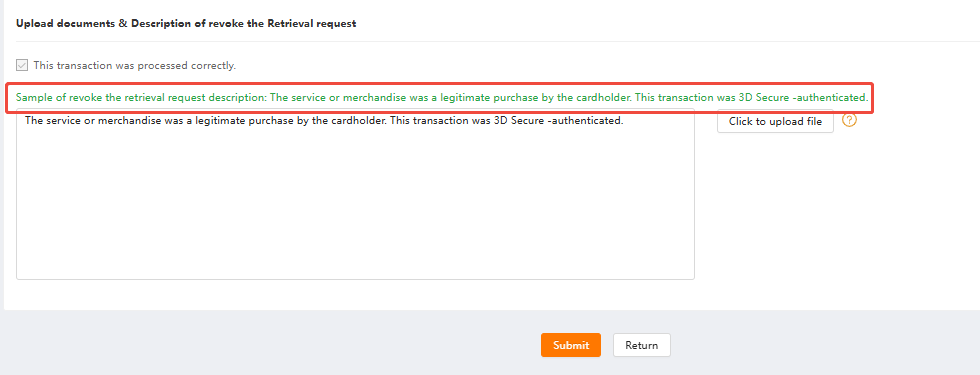
- After uploading images, you can click on them to enlarge and preview.
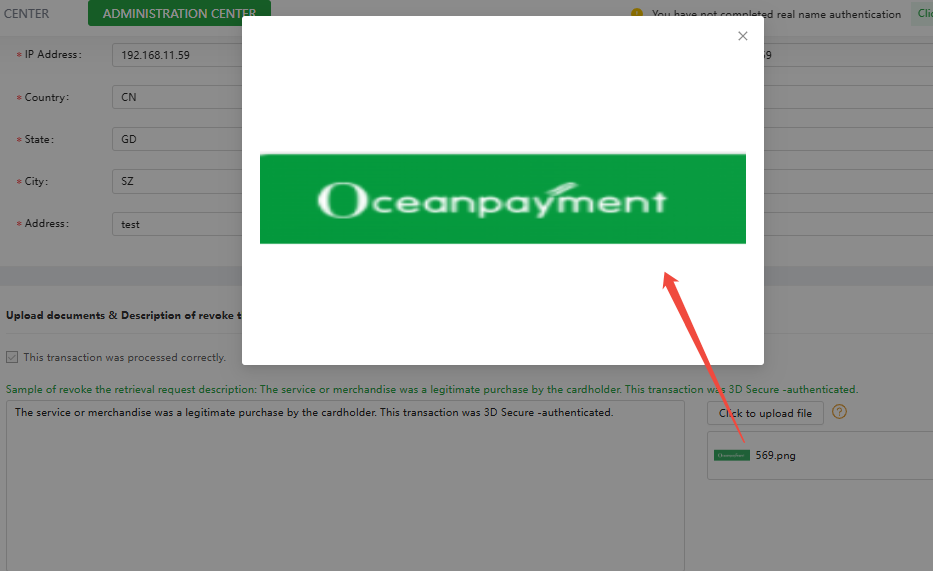
- After completing all the required fields (other fields can be submitted according to the actual situation) and clicking submit, the process status will change from " Request Non-Fulfilment" to " Request Fulfilment".
4.7 Material Download
Click [Download Voucher] to download the image files uploaded by the merchant
retrieval response.

4.8 Klarna Retrieval
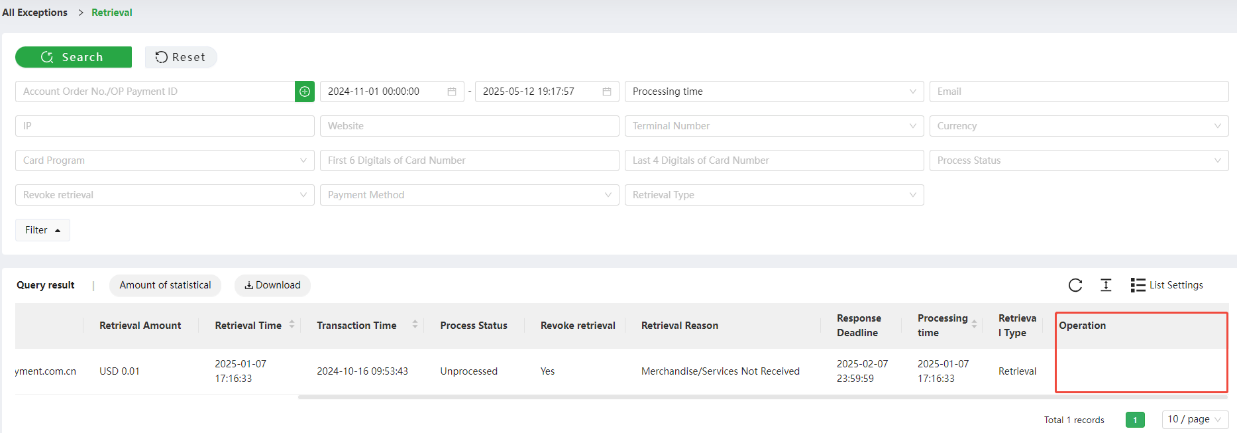
Klarna retrieval transactions do not need to be processed in the [Retrieval] section, and the content of operations is blank. Merchants process Klarna Dispute related
orders in the [Dispute] section.
4.9 Requirements for the Retrieval Document
Information is correct and complete
- Click [Retrieval Response] to enter the [The Request Fulfilment document] submission interface. As shown below [Transaction Information] and [Shipping Address], please click the [Modify] button to fill in the corresponding information correctly and completely.
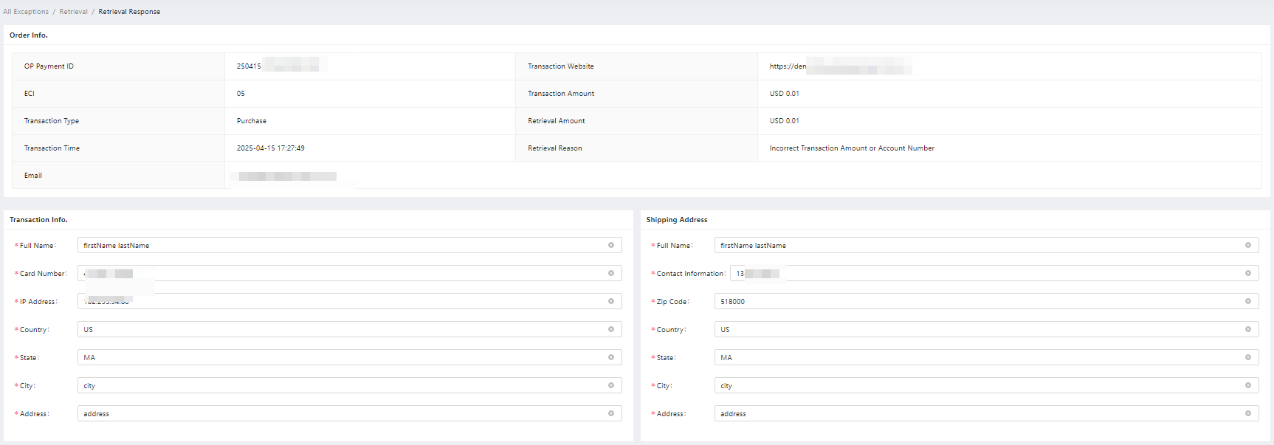
The request fulfilment document should be in English
- Since the working language of the acquiring bank is English, in addition to the information filled in by the cardholder, the Request Fulfilment document submitted by the merchant should also be in English. Please do not use Chinese.
More comprehensive information submission
- After the online upgrade of the Request Fulfilment document, it not only provides a more comprehensive selection of materials, but also provides corresponding sample text for merchants to use. Please refer to the following illustration:
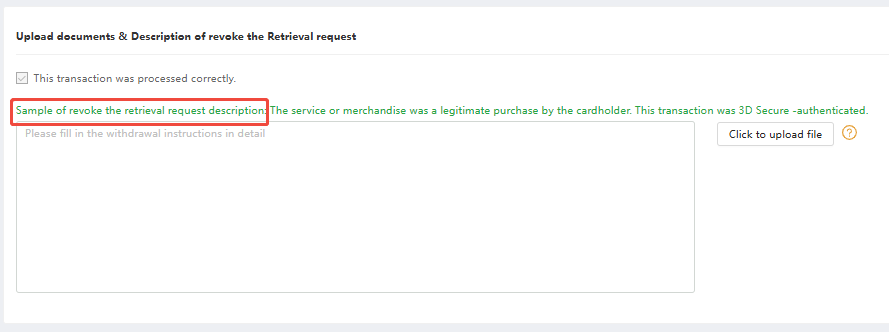
Merchants can submit multiple options and provide corresponding certification materials according to their own circumstances (1 to 5 pictures can be provided for each certification material). In short, the more comprehensive and effective the information in the request fulfilment document is, the greater the chance of the retrieval response to be approved.
The supporting materials must be valid pictures
- The supporting materials must be pictures, and 1 to 5 pictures can be provided. The picture should be clear, and single picture should be within 3M; the picture should be related to the retrieval response, and is to support it.
5. Fraud
5.1 What is Fraud
Each issuer will report consumer fraud to the corresponding agency (TC40 or SAFE). Based on the reports issued by these agencies, the acquiring bank and the issuers will understand the fraud risk of the transaction and adjust the risk control strategy timely to ensure that the fraud is eliminated. Transactions are controlled within reasonable limits. Visa's fraud reporting is TC40; MasterCard's fraud reporting is SAFE. We call the transactions covered by these reports Fraud.
-
TC40- Transactions reported by issuers for VISA transactions
-
SAFE(System to Avoid Fraud Effectively) – Transactions reported by issuers for MasterCard transactions
5.2 Fraud Reasons
| Fraud Reasons |
|---|
| Lost / Lost Fraud |
| Stolen / Stolen Fraud |
| Card not received as issued / Never Received Issue |
| Fraudulent application / Fraudulent application |
| Issuer-reported counterfeit / Counterfeit Card Fraud |
| (Miscellaneous/account takeover) / Account Takeover Fraud/Account or Credentials Takeover |
| Fraudulent use of account number / Card Not Present Fraud |
| Acquirer-reported Counterfeit |
| Other |
| Manipulation of Cardholder/ ACCOUNT HOLDER MANIPULATION |
| Modification of Payment Order |
6. Introduction to Fraud Functions
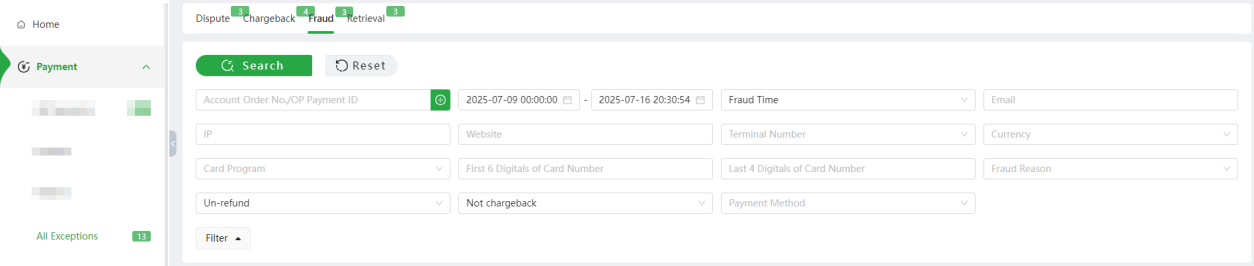
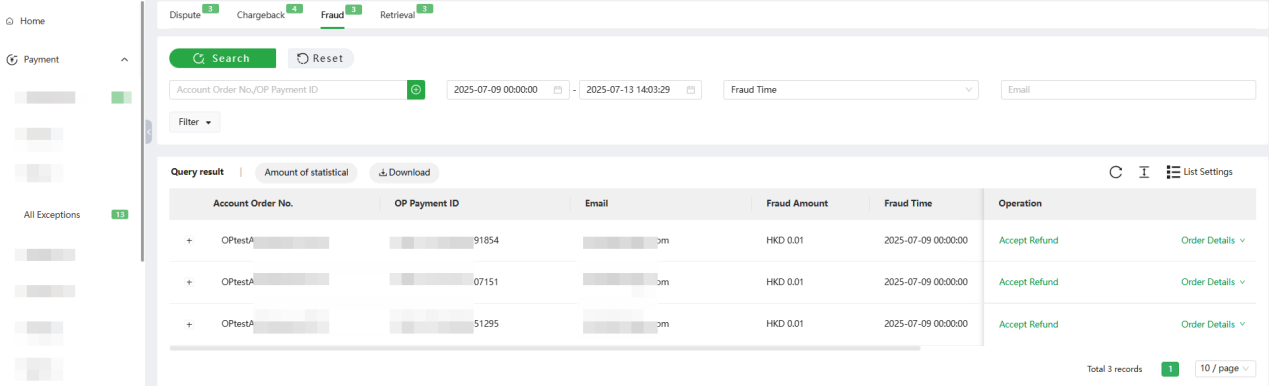
Click [Payment] - [All Exceptions] - [Fraud], Merchants can query the corresponding retrieval transaction information according to Account Order No. or OP Payment ID. Orders can also be filtered by Transaction Time, Fraud Time, Terminal, etc.
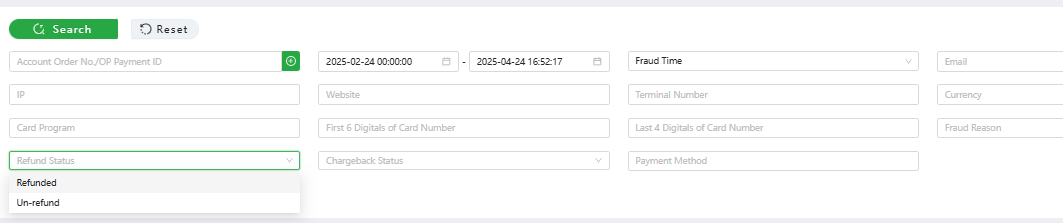
6.1 Search
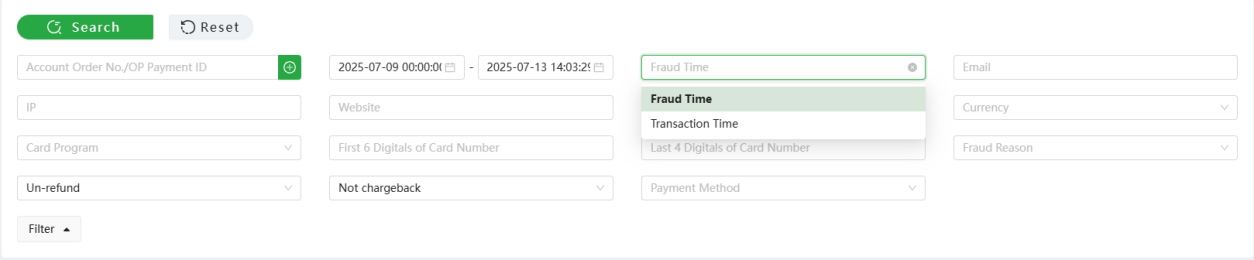
- Time: Fraud time as default
-
Transaction time: The time when this transaction takes place
-
Fraud time: The time when this transaction was tag as Fraud
-
Merchant Processing Time: The time for merchants to process fraud transactions, e.g., when a merchant accepts refund.
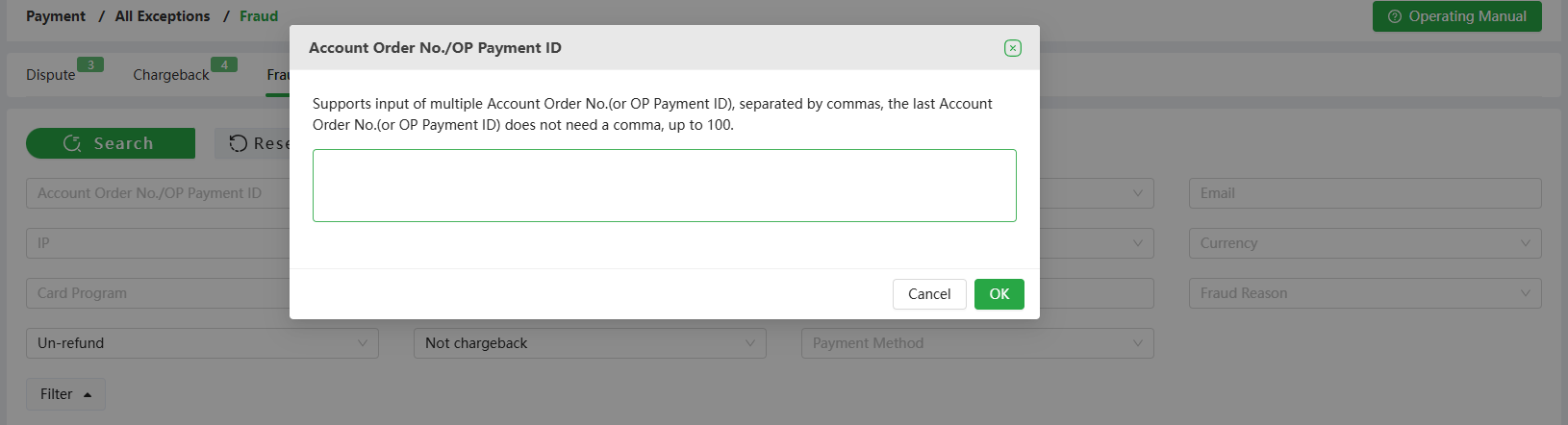
- Account order number/Payment ID: You can enter the account order number
or payment ID for query
-
You can use [+] to enter multiple account order numbers, or multiple payment ID
-
Either enter the account order number or payment ID at the same time; Do not enter the account order number and payment ID at the same time
-
Multiple account order numbers (or multiple payment ids) must be separated by commas
- Refund status: Refunded, Un-refund
-
Terminal number: Option to select multiple terminal numbers at the same time
-
Mail: Case sensitive, accurate query
-
Chargeback or not: Optional Yes or No
-
Payment method: Option to select multiple payment methods at the same time
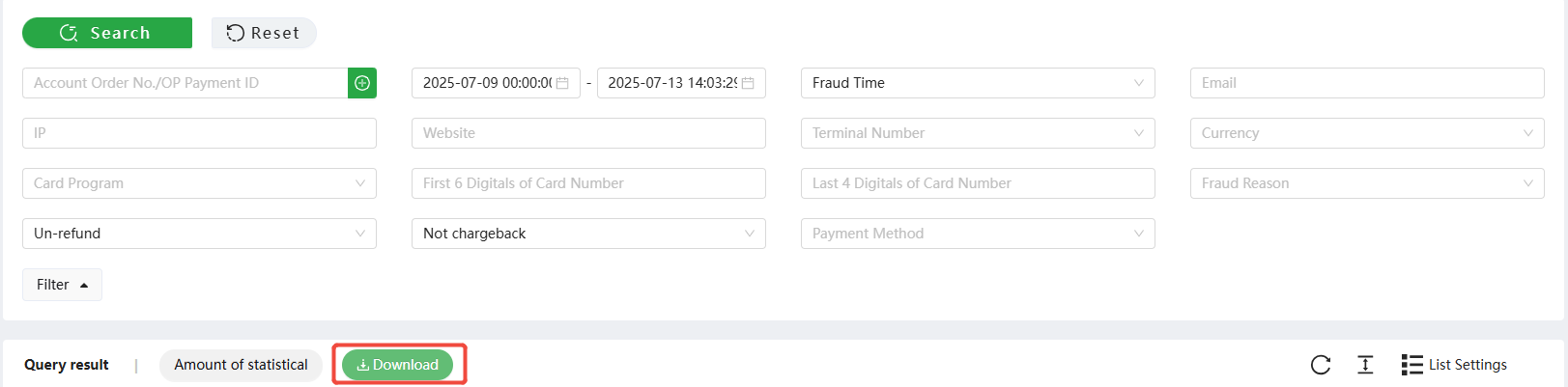
6.2 Download
- Click [Download] to download the query result
6.3 Accept Refund
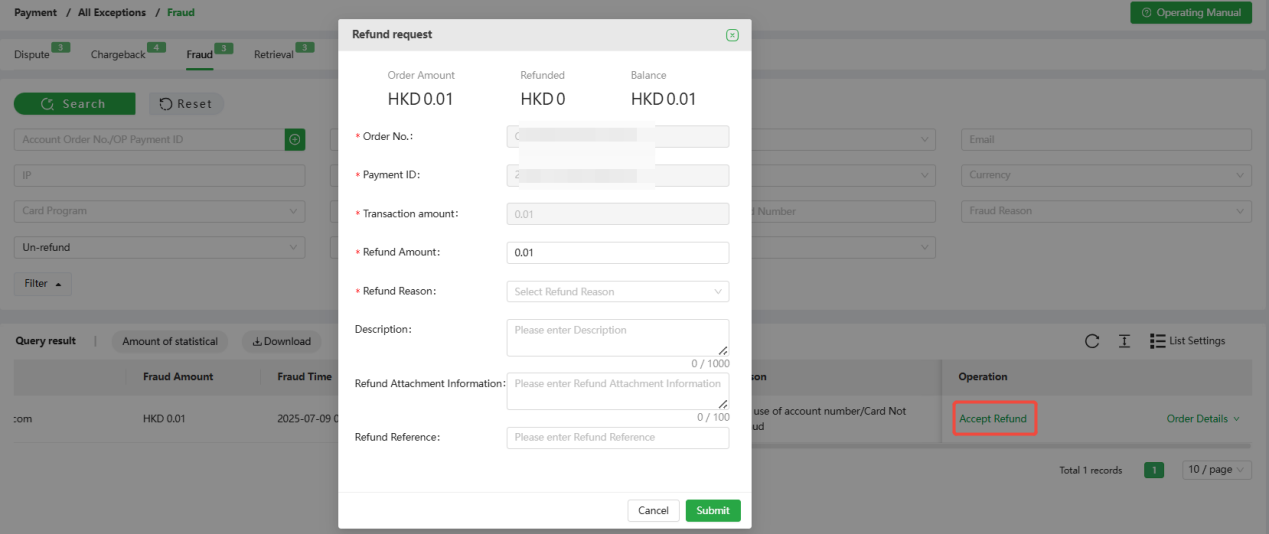
Click [Accept Refund], the page will display order details, and merchants can apply for fully or partially refund.
-
Accept Refund: Click [Accept Refund] to accept this fraudulent transaction and prevent this transaction from escalating to a chargeback by issuing a refund.
-
If you do not [Accept Refund] in time after receiving the fraud notification, there may be more than an 88% chance of chargeback. When a chargeback occurs, in addition to deducting the transaction amount, the bank will also need to charge an additional chargeback processing fee.
-
To avoid chargebacks, you need to deal with fraud in time to avoid losses.
6.4 Order Details
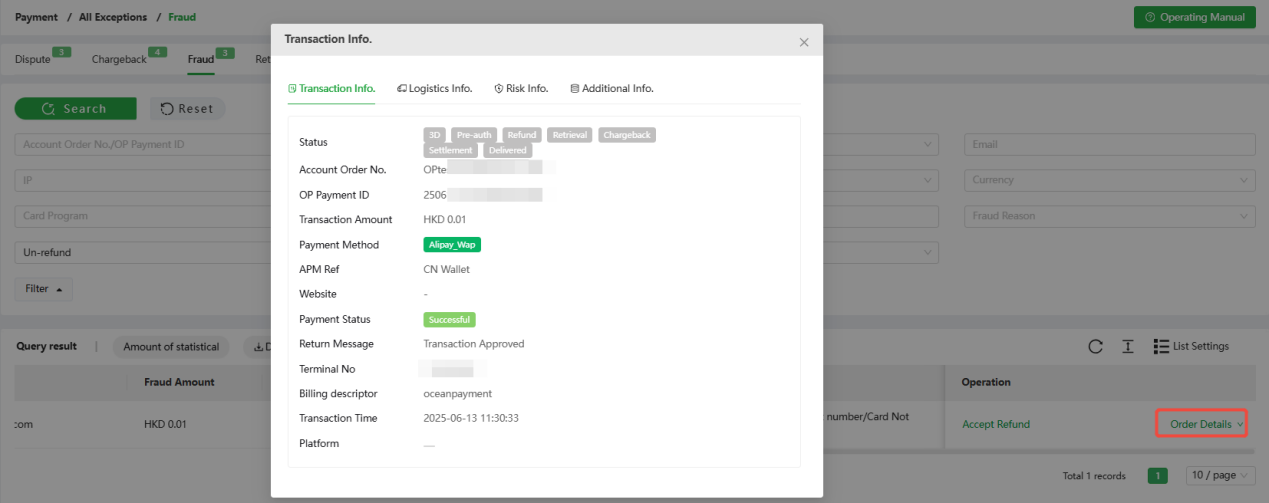
- Click [Order Details] to view this transaction information, logistics information, risk information, and additional information.
6.5 Unresolved Reminder
As shown in the Fraud section below, you can view all orders under Fraudulent Transactions with statuses: Un-refund and Not Chargeback.
7. Klarna Dispute
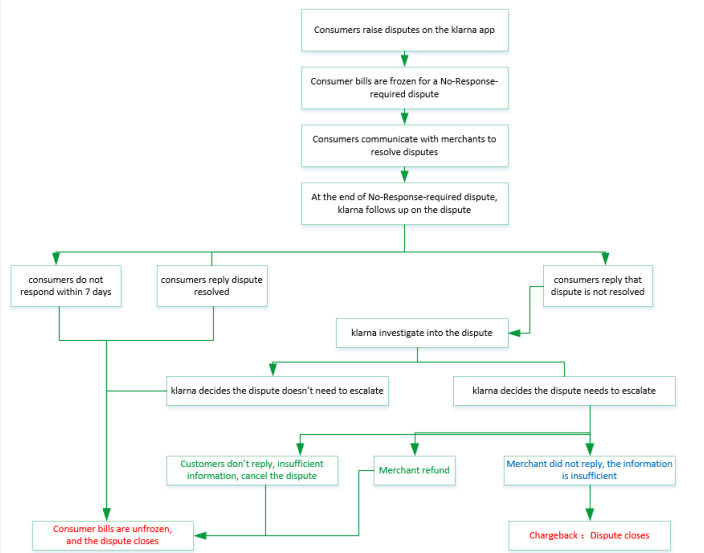
7.1 What is a no-response-required dispute
When a customer opens a dispute with Klarna, Klarna will automatically pause the invoice and advice the customer to:
-
Return the items in case of returns;
-
Reach out to merchant in case of other dispute reasons (goods not received, faulty goods and incorrect invoice)
After the customer reports a dispute/ return to Klarna the merchant has 21 days
to resolve the case (resolution time). Only 'unauthorized purchases' (fraud raised by
customers) has a resolution time of 0 days due to the urgency.
If the merchant, and the customer can't reach a solution on your own within the
given resolution time, Klarna will step in to investigate and the order will turn into
response-required dispute.
The dispute before Klarna step in to investigate in Klarna’s overall dispute
process is referred to as the no-response-required dispute.
7.2 What is a response-required dispute
When a no-response-required dispute cannot reach an agreeable solution, Klarna gets involved in Klarna’s dispute process of the order, and this dispute becomes a response-required dispute.
Each dispute has a corresponding deadline, the deadline shows the final date until the merchant can respond to the request.
For a Klarna order, as long as the dispute remains unresolved, the consumer can continue to seek more information from the merchant and initiate multiple dispute requests. For a Klarna dispute order, if the consumer accepts the merchant's proposed solution, the current dispute is considered closed.
If a consumer has accepted and closed a Klarna disputed order, but later continue to dispute, they can initiate a new dispute case. Until the new dispute case is resolved, the consumer can still continue to seek further information from the merchant and initiate multiple dispute requests.
If a consumer does not accept the merchant's proposed solution for a Klarna disputed order, the dispute will escalate to a chargeback, and Klarna will directly refund the consumer.
After a Klarna dispute is escalated to a chargeback, the merchant cannot submit a Process.
For more details on Klarna disputes, please refer to:
https://docs.klarna.com/disputes/disputes-app-in-merchant-portal
7.3 Klarna Common Dispute Reasons
| 争议原因(中文) | Dispute Reasons |
|---|---|
| 服务未提供或未收到商品 | Goods not received |
| 退款/退货 | Return |
| 货不对版/货物损坏 | Faulty Goods |
| 已取消的商品/服务 | Incorrect Invoice |
| 重复交易 | Already Paid |
| 未授权交易 | Unauthorized purchases |
| 高风险订单 | High risk order |
| 受新冠疫情影响 | Pandemic impact |
For more information on dispute handling requirements, please refer to Klarna [Merchant Protection Program] by the following link: https://www.klarna.com/international/enterprise/merchant-protection-program/
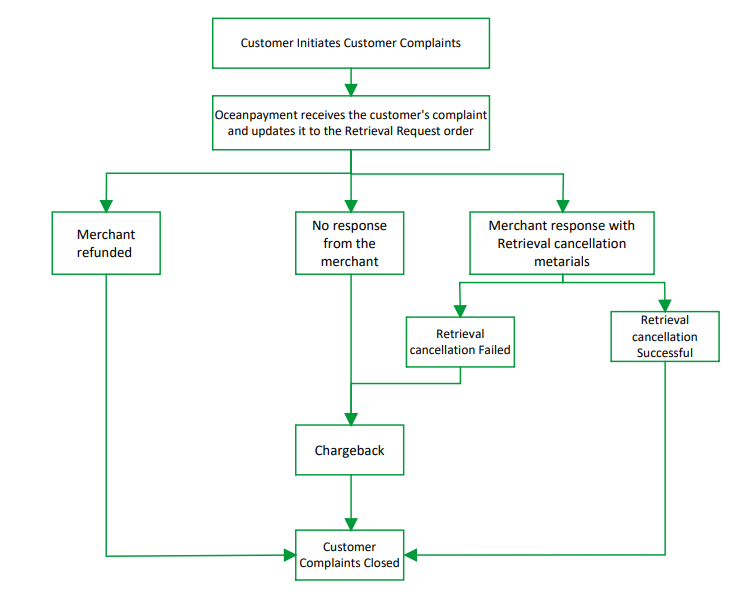
7.4 Klarna Dispute processing flow (response-required disputes and no-response-required disputes of Klarna)
8. Introduction to Dispute Function
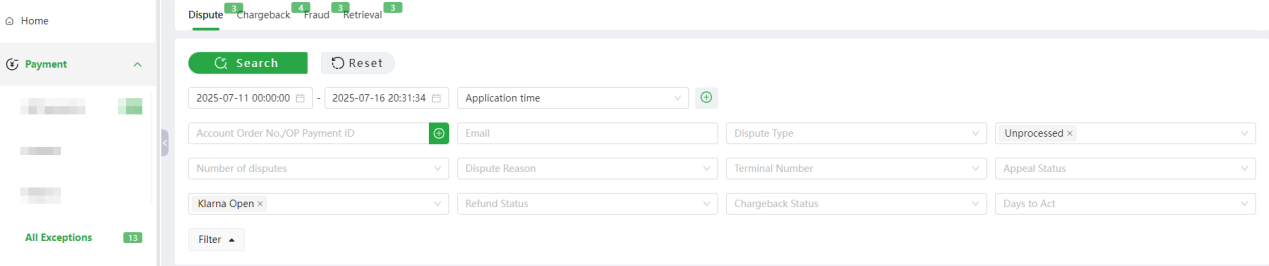
- Click [Payment] - [All Exceptions] - [Dispute], Merchants can query the corresponding dispute transaction information according to Account Order No. or OP Payment ID. Disputes can also be filtered by Transaction Type, Dispute Type, Process Status, Number of Disputes, Klarna status etc.
8.1 Search
- Time type: optional application time, transaction time, dispute time, dispute response deadline, no-response-required disputes start time, no-response-required disputes deadline; default query [Application time].
-
Application time:the time when response-required disputes and no-response-required disputes are updated in the backend
-
Transaction time:The transaction time of this transaction
-
Dispute time: The time when the Klarna order was escalated to a dispute.
-
Dispute response deadline: The final deadline for submitting a Klarna dispute
appeal in the Oceanpayment backend.
-
No-response-required disputes start time: The time when the Klarna order was escalated to a no-response-required dispute.
-
No-response-required disputes close time: The end time of the Klarna no-response-required order.
-
Closed at:The closing time of the no-response-required disputes and response-required disputes at Klarna system
-
Merchant Processing Time: The time for merchants to process disputes, e.g., when a merchant submits a Re-presentment, clicks the "Contact Consumers" button, or accepts refund.
- You can select up to five-time criteria simultaneously for cross-query.
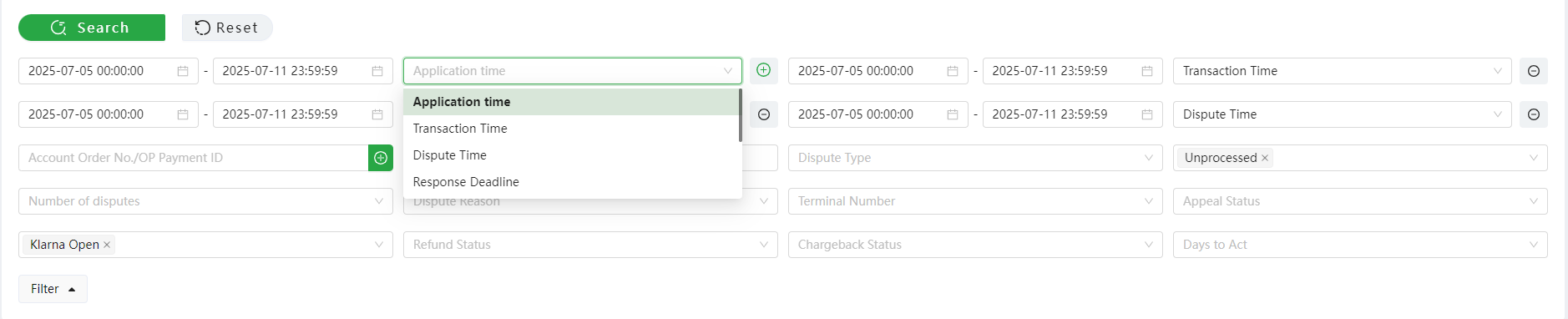
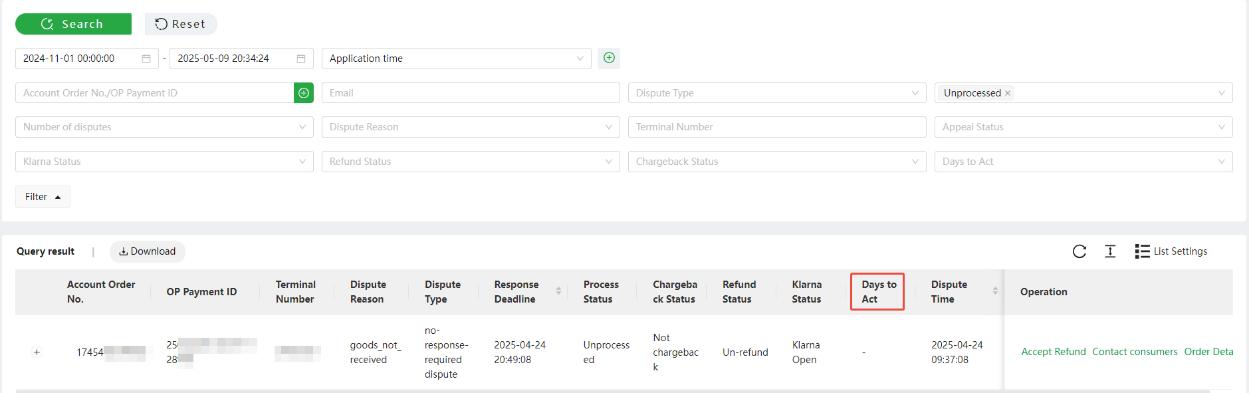
- Select the process status as "Unprocessed" in the condition filter, and you can view the remaining days until the response deadline for the order. If the response deadline has not been reached, the days to act range will be: today, 1, 2, 3, 4, 5, 6, 7, or over 7 days; if the current time has already exceeded the response deadline, the days to act will be displayed as "-".
-
Start time: Query the start time based on the selected time type.
-
End time: Query the end time based on the selected time type
-
Account order number/OP payment ID:enter the account order number or
payment ID to query.
-
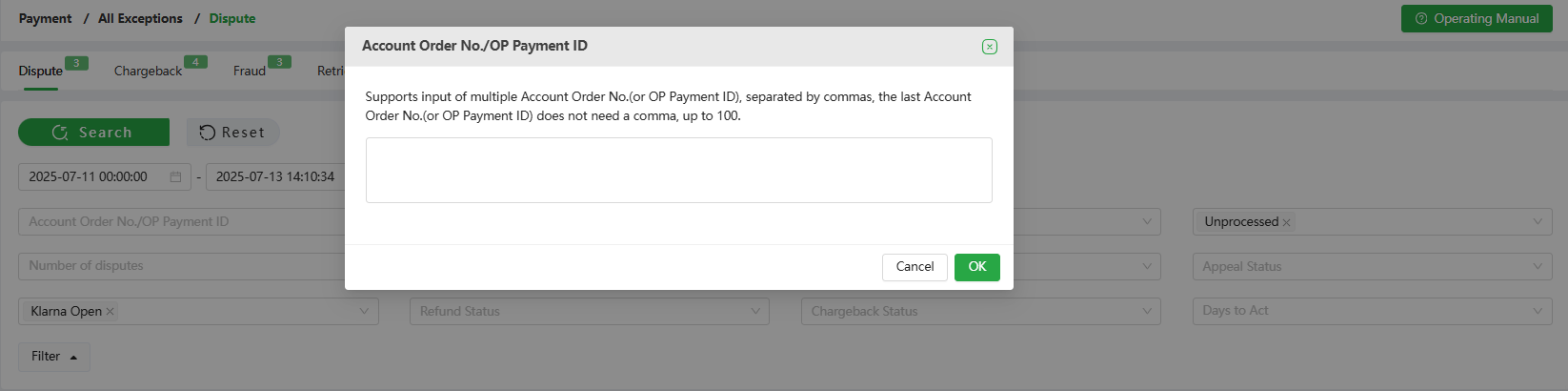
Enter multiple account order numbers or multiple OP payment IDs through [+] as shown below
-
Either enter the account order number or OP payment ID; do not enter the account order number and payment ID at the same time
-
Multiple account order numbers (or multiple OP payment IDs) must be separated by [comma in English format]
-
Dispute type: You can query response-required disputes and no-response-required disputes. You can query multiple types or a single type. By default, you can query all dispute types.
-
Process status: You can query unprocessed, processed, and no action required.
-
No action required:** **order refundable amount = 0 (The status judgment is updated every 2 hours).
-
Processed: The disputed order has submitted a dispute appeal; or for orders under no-response-required condition, click [contact customer] to confirm.
-
Unprocessed: Orders other than [No action required] and [Processed] are all [unprocessed] orders.
-
Unprocessed orders of the no-response-required disputes: It is recommended that the merchant communicate with the consumer before they turn into response-required disputes and reach an agreement. You can click [contact consumers] and complete the confirmation to record the orders that have been processed;
-
Unprocessed orders of response-required disputes: Klarna intervenes and requires the merchant to submit dispute presentment materials before the dispute response deadline, or submit a dispute presentment supplementary refund explanation after refund.
-
Number of disputes: Multiple choice is available by selecting from the checkbox.
-
Dispute reason: Filter based on dispute reasons, multiple selections are available, and all dispute reasons are queried by default.
-
Terminal number: Supports querying multiple terminal numbers.
-
Email: Case-sensitive, precise search
-
Appeal status: The appeal status of the dispute can be queried. By default, all
statuses are queried.
-
Not Re-presentment:All no-response-required disputes are displayed as [Not Re-presentment]; response-required disputes that do not have been submitted [Dispute Response]
-
Dispute re-presentment: The response-required dispute orders that have been submitted [Dispute Response]
- Klarna process status: Klarna API synchronizes the processing results of Klarna side, and the default query processing status.
-
Klarna Open: Klarna has not yet given the final resolution of the dispute
-
Klarna Close: Klarna has given the processing result of this disputed order. The consumer may have canceled the dispute, a chargeback may have occurred, or the merchant may have issued a refund, etc
- Refund or not: whether there is a refund record for no-response-required disputes and response-required disputes.
16.Chargeback or not: whether there is a chargeback record for no-response-required disputes and response-required disputes.
8.2 Download
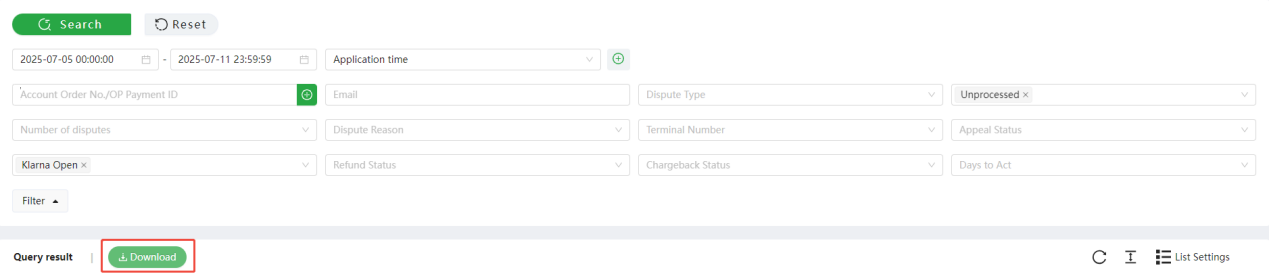
- Click [Download] to download the queried results
8.3 Unresolved Reminder
-
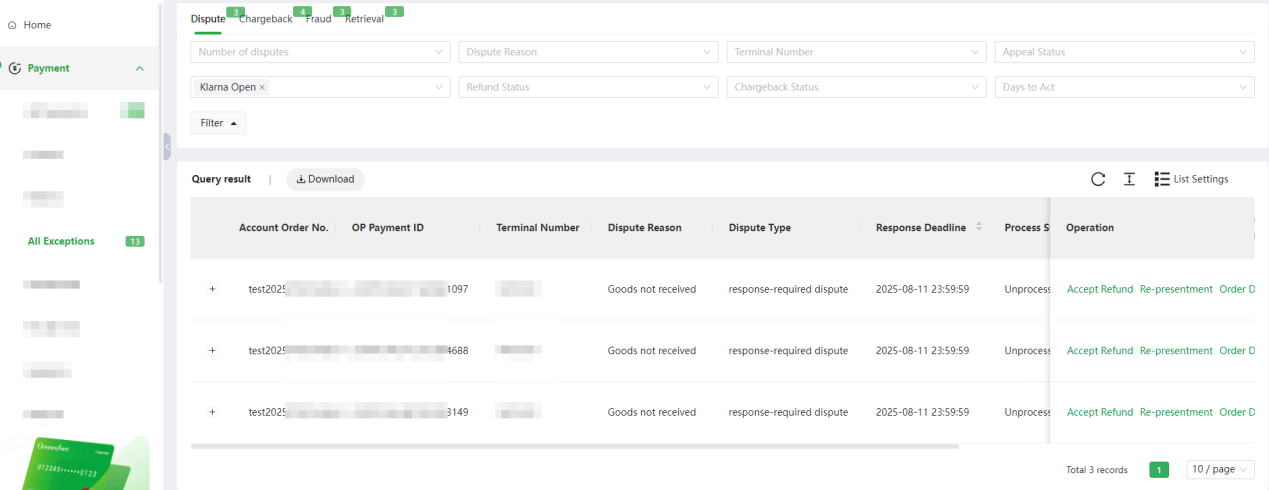
Click on [Dispute] to view all orders in the [Unprocessed] status under [Dispute] Section.
-
After reselecting from the filter, click [Search] to query the data according to the
updated search criteria.
8.4 No-response-required disputes processing
For no-response-required disputes, merchants should actively communicate with consumers to reach a mutually agreeable solution and avoid escalating the case to Klarna intervention beyond the deadline. Once Klarna gets involved, in addition to responding with the necessary dispute materials, there may be dispute fees or escalation to a chargeback. Communicate with consumers to reach an agreement with no-response-required disputes to avoid escalating into a response-required dispute.
Starting from 2024-01-01, funds will be frozen (retrieval request) for Klarna no-response-required disputes. lf a no-response-required dispute has subsequent chargeback or refund,the system will immediately automatically release the funds and return them to the consumer. if there is no subsequent chargeback or refund, the system will automatically release the funds after 120 days and proceed with the normal settlement process.in order to reduce subsequent chargebacks for no-response-required disputes, it is recommended that merchants strengthen service response and communicate more with consumers to actively resolve customer complaints.
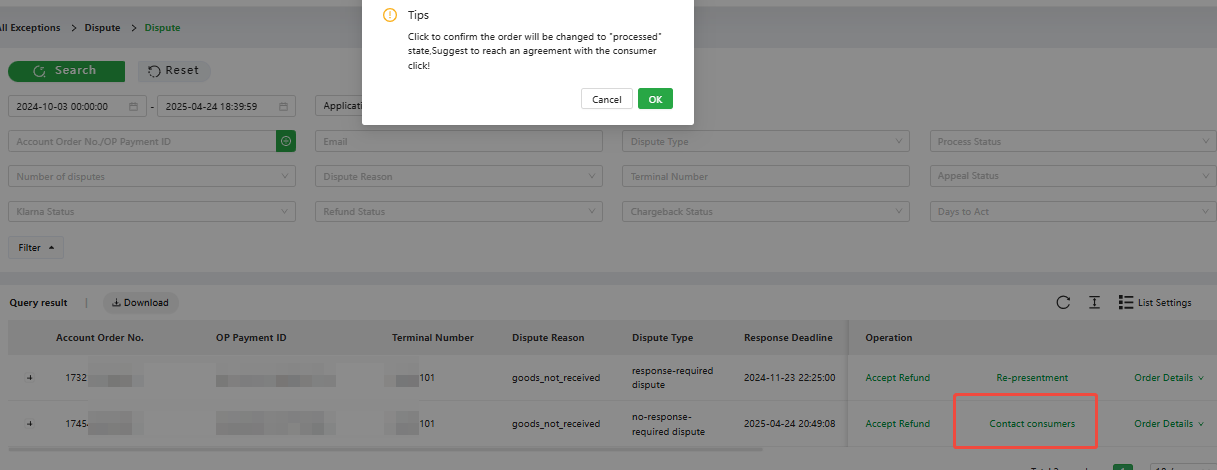
- [Contact Consumers]:** **Merchants can click [Contact Consumers] and confirm to record the no-response-required disputes that have been processed.
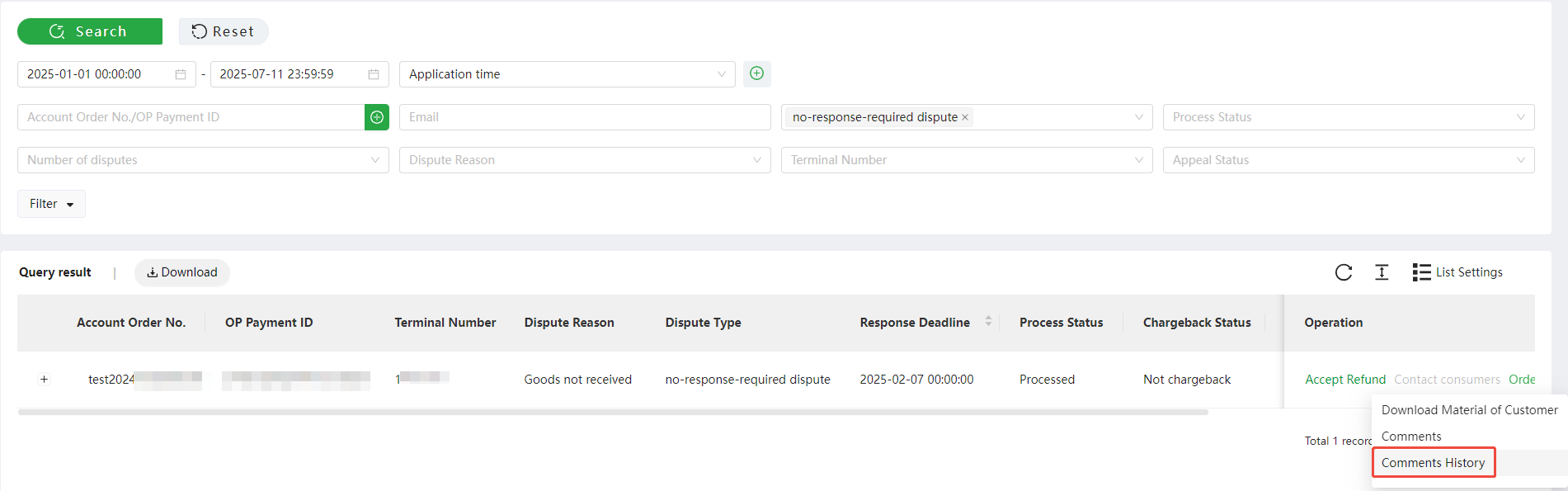
- [Comments History]: Merchants can click [Comments History] to record the communication with consumers about the no-response-required disputes.
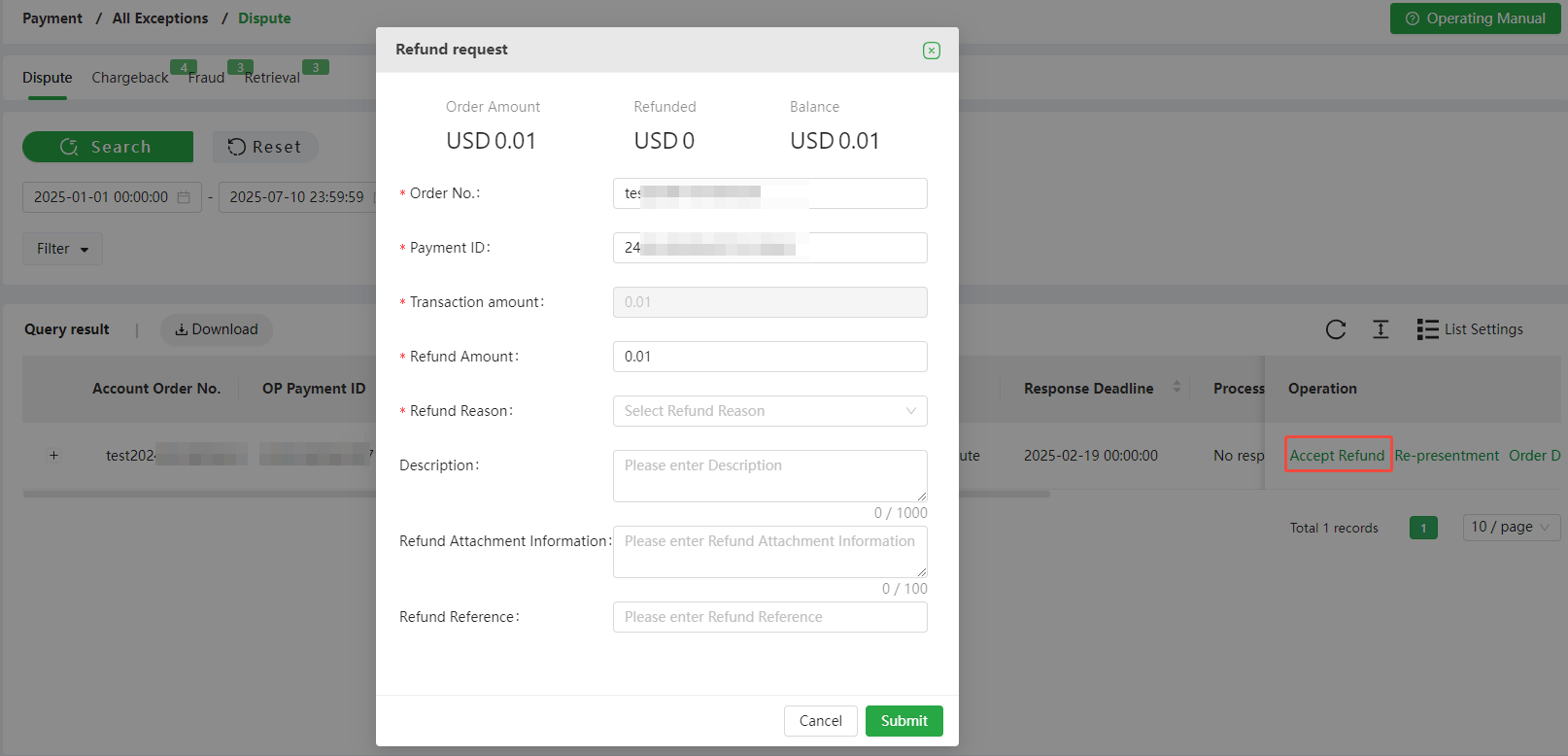
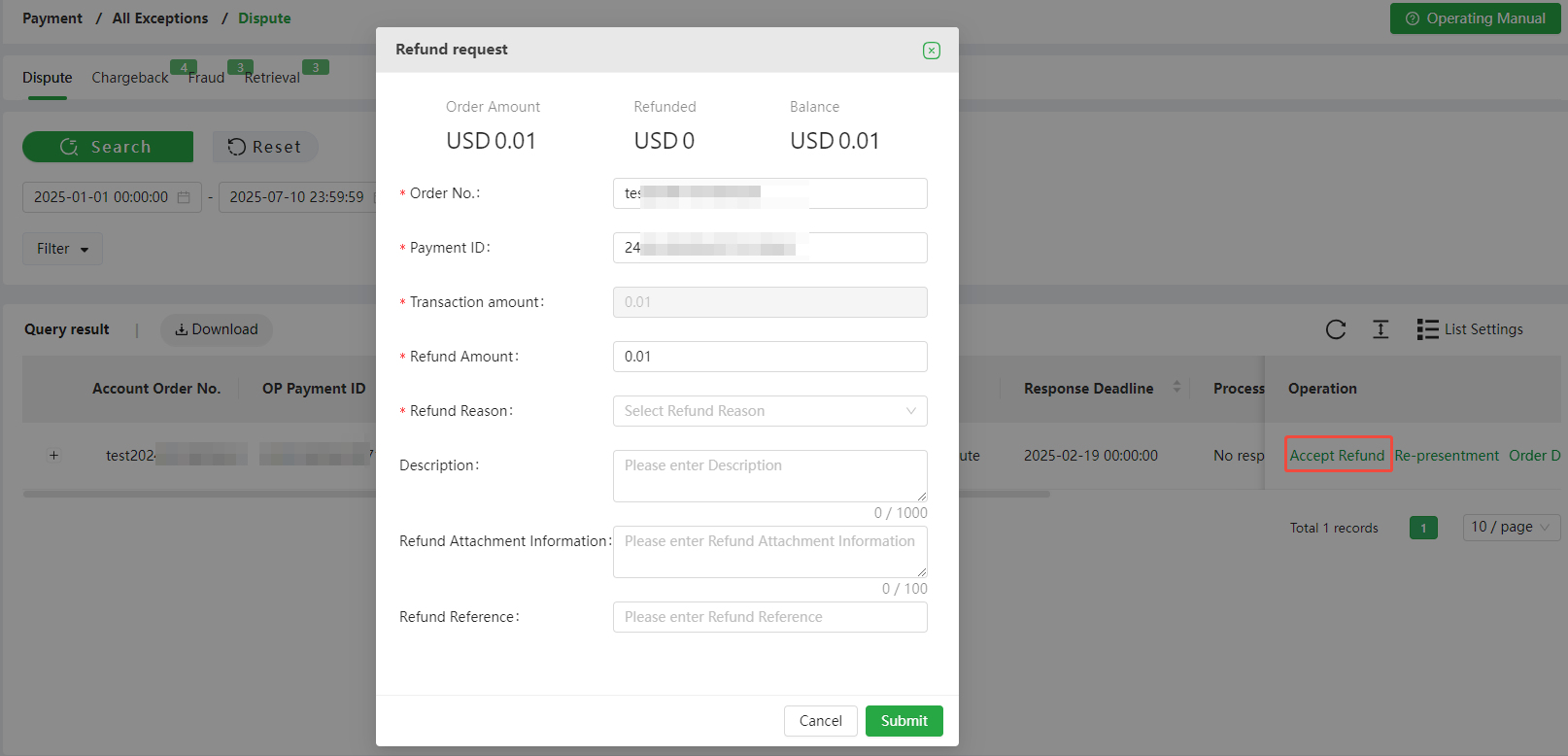
- [Accept Refund]: Merchants can click [Accept Refund] and confirm to refund no-response required disputes. Click [Accept Refund], the page will display order details, and merchants can apply for fully or partially refund.
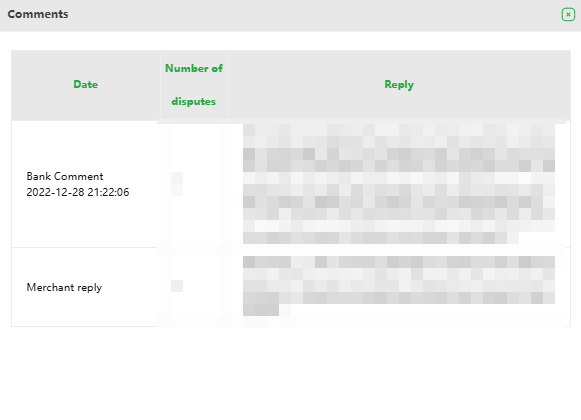
- [Comments]: Merchants can click [Comments] to view all communication records (if any) of the comment of this dispute provided to Klarna when the consumer initiated the response-required dispute.

8.5 Response-required disputes processing
-
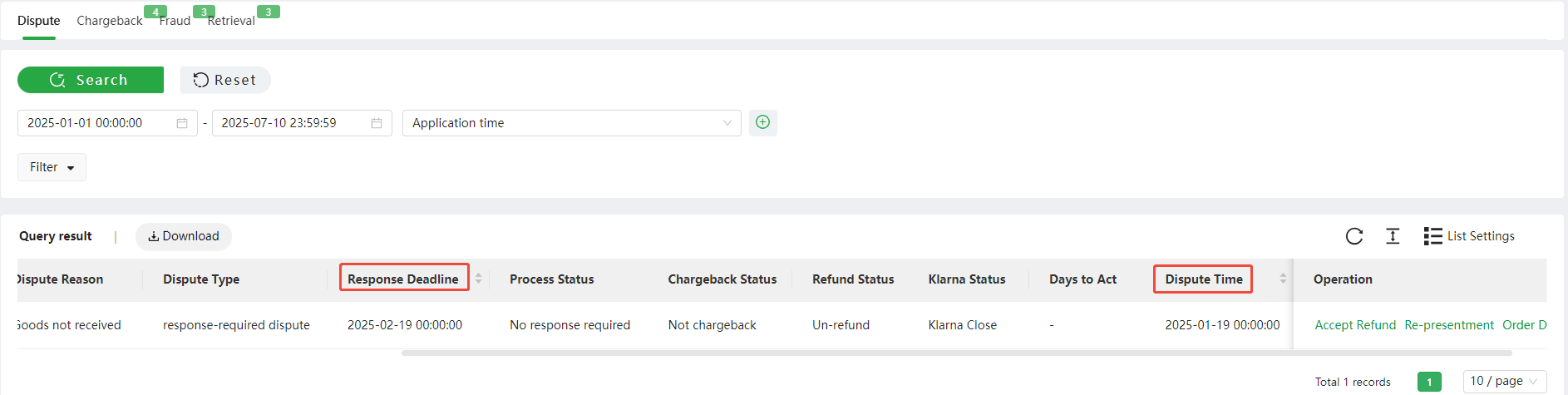
Dispute Time: This transaction was escalated to a dispute. It is the time when the dispute started.
-
Dispute Response Deadline: Merchants can choose to either "Accept" or "Dispute Response" before the dispute response deadline. If the dispute response time is exceeded, there is a high possibility that the dispute will escalate to a chargeback, resulting in loss of the chargeback amount and dispute fees for the merchant.
Tips: Do not use the [Dispute response deadline] to handle disputes. lt is recommended to use the [Dispute Time] to handle disputes to avoid consumers escalating complaints due to long waiting times, causing Klarna to directly determine a chargeback.
- Accept Refund: Clicking "Accept Refund" allows merchant to refund the dispute order. After clicking "Accept Refund," please proceed to the next step and provide a refund explanation in the "Comment" section when initiating the dispute Process, so that Klarna can close the dispute.
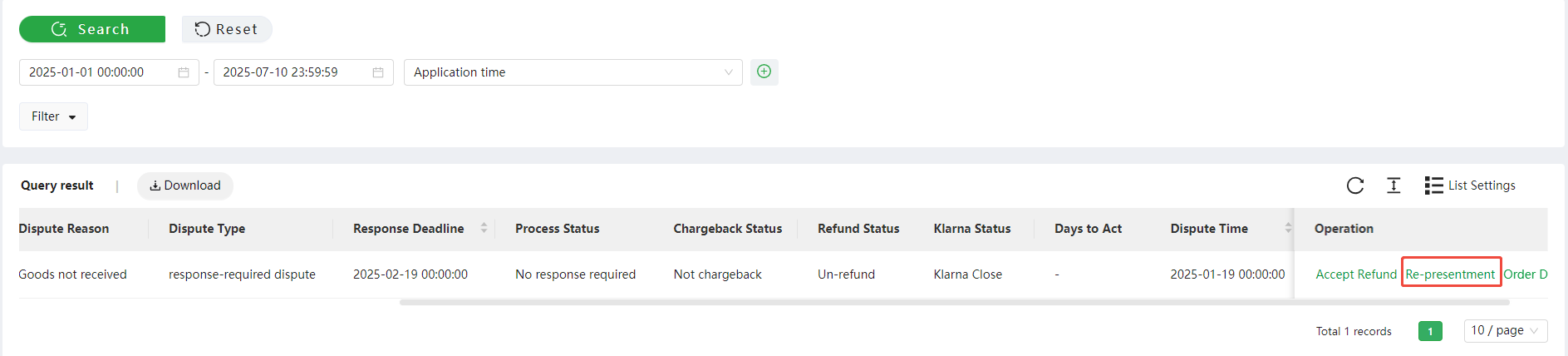
- Re-presentment: Clicking "Re-presentment" will take merchant to the page where merchant can apply for dispute re-presentment and submit the necessary dispute materials required by Klarna, following the instructions and providing comments on the dispute.
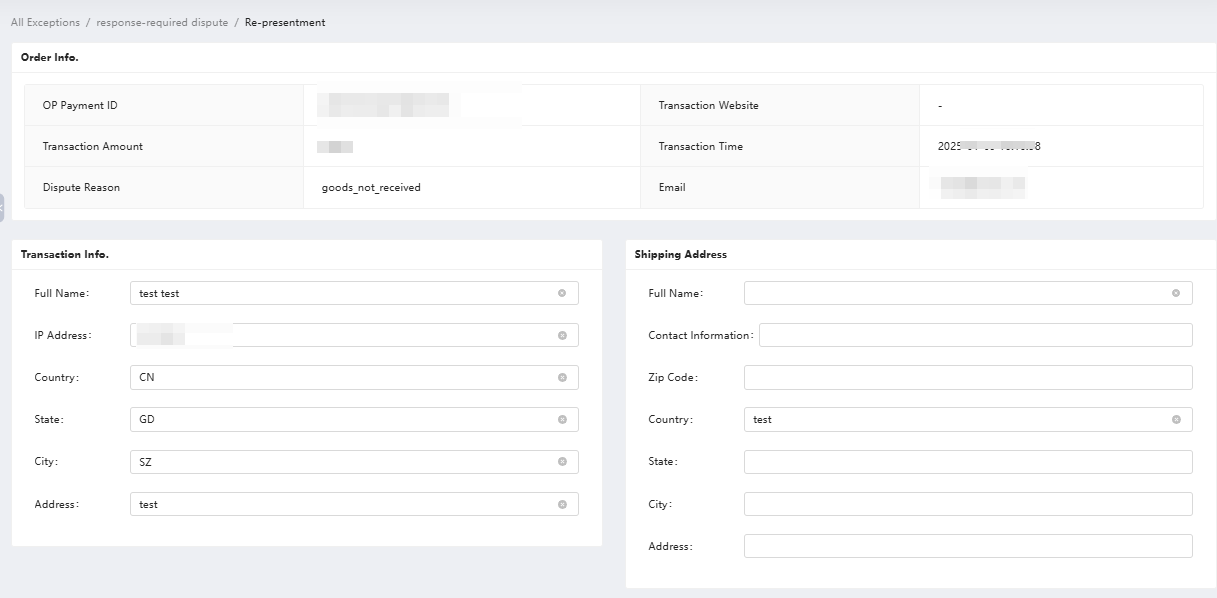
Dispute Information Filling: The following is the required information for Klarna Dispute APl. Please follow the guidelines to complete the content.

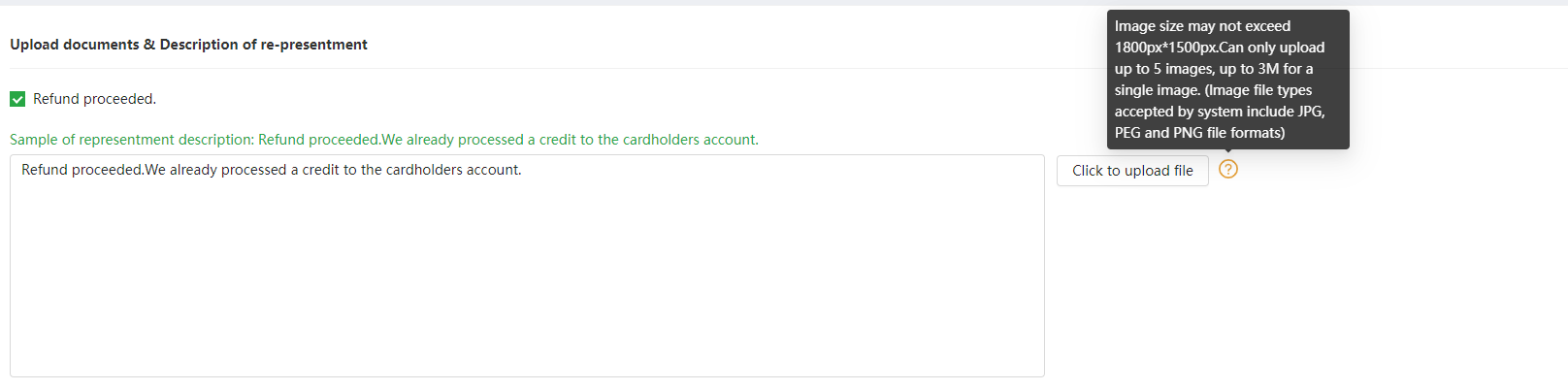
Upload documents & Description of the appeal request: After [Dispute Information Filling], [Next step] can enter the [submit] link, and you can submit relevant supplementary materials according to the guidelines.
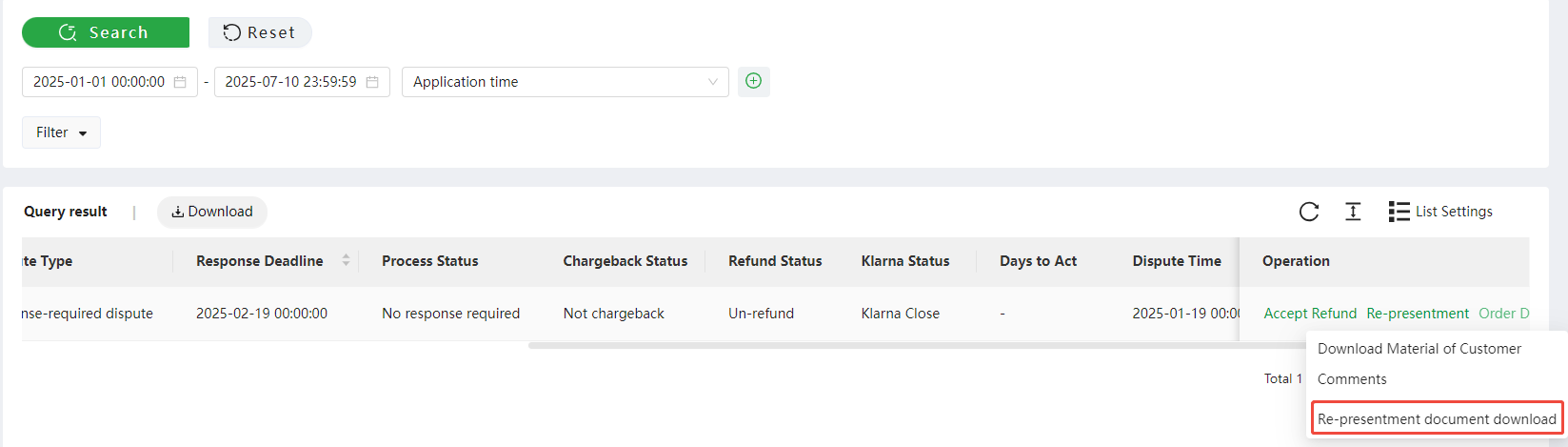
Download Material of Merchant: After submitting the Re-presentment, the processing status will be updated to "Processed"; click Order Details > Re-presentment document download to access the disputed appeal documentation.
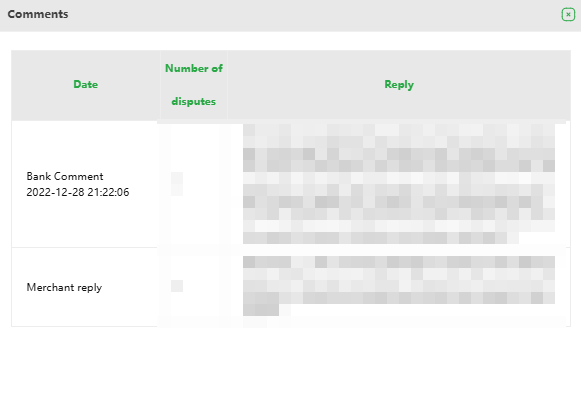
Comments: Merchants can view the complete response history for the current Klarna dispute case by clicking Comments.
8.6 Klarna Dispute Representment Material Guideline
Upload instructions: According to the guidelines for different dispute reasons, combined with the content of dispute comments (Comment), truthfully fill in the relevant order status.
Sample of re-presentment Description: Guidelines on how to describe the content of dispute re-presentment; it is recommended to directly refer to the sample text.
Proof of material: Directly upload dispute proof images; (supporting jpg, jpeg, png formats); proof documents can be uploaded for each scene described in the dispute documents explanation. After uploading, click to preview the images.
Dispute re-presentment files must be in English: English is the official processing language of Klarna. so please provide dispute representant files in English, and dispute materials are automatically submitted to Klarna through the APl integration system.
**Upload files must be valid images: *Upload files must be images, and 1-5 images can be provided. File Formats accepted jpg, jpeg and png. The image must be clear and the maximum file size for individual images must not exceed 3MB, and the dimensions must not exceed 1800px 1500px. Notes: Personal identity documents including ID cards, passports and cards attached to dispute response shall undergo desensitization processing.
The total size of Klarna Dispute Materials should be controlled within 7MB, otherwise, they cannot be synchronized to Klarna.
8.7 Klarna Chargeback
- Klarna Dispute processing flow is as follows:
-
[No response required]: Merchant communicates with the consumer
-
[Dispute]: Klarna intervenes and the merchant needs to response to Klarna
-
[Chargeback]: Merchant does not respond to the dispute, or Klarna decides that the merchant's dispute re-presentment is failed.
-
[Dispute Refund]:When the merchant accepts the dispute, the OP system will automatically flag a chargeback with a chargeback amount of “0” to collect the Klarna Dispute Fee.
Once Klarna incurs chargeback, the Klarna Dispute process ends and the merchant has no further opportunity to initiate re-presentment.
9. Re-presentment process
9.1 When to initiate Re-presentment
-
The merchant believes that the chargeback by the cardholder is unreasonable and the merchant has sufficient information to support the re-presentment
-
The merchant has sufficient supporting information to prove that the goods or services were provided to the cardholder correctly.
9.2 Scenarios where re-presentments are not supported
-
Refunded transactions: Transactions with a chargeback amount of 0
-
Brazil local credit cards: Do not open re-presentment process, need to accept the chargeback by default.
-
Mexico local credit cards: Do not open re-presentment process, need to accept the chargeback by default.
-
RDR: International credit card Visa, RDR chargeback alert transaction
-
International Credit Card Discover: Retrieval request orders that have not been responded to resulting in escalation to chargeback, not supported re-presentment when chargeback occurred
-
Klarna chargeback: Klarna's dispute process is [No response required - Dispute - Chargeback], once chargeback occurs, the dispute result is indicated as chargeback, and no longer supports the re-presentment.
-
Korea Local Payment: Dispute process is [Retrieval request - Chargeback], once chargeback occurs, it indicates that the result of the dispute retrieval request is chargeback, and no longer supports the re-presentment.
Scenarios that do not support re-presentment displayed effect in the system: The response deadline has expired when the chargeback is updated.
9.3 Requirements for the document
-
Information is correct and complete
-
Click [Re-presentment] to enter the [Re-presentment document] submission interface. As shown below [Transaction Information] and [Shipping Address], you can edit and modify it directly and fill in the corresponding information correctly and completely.
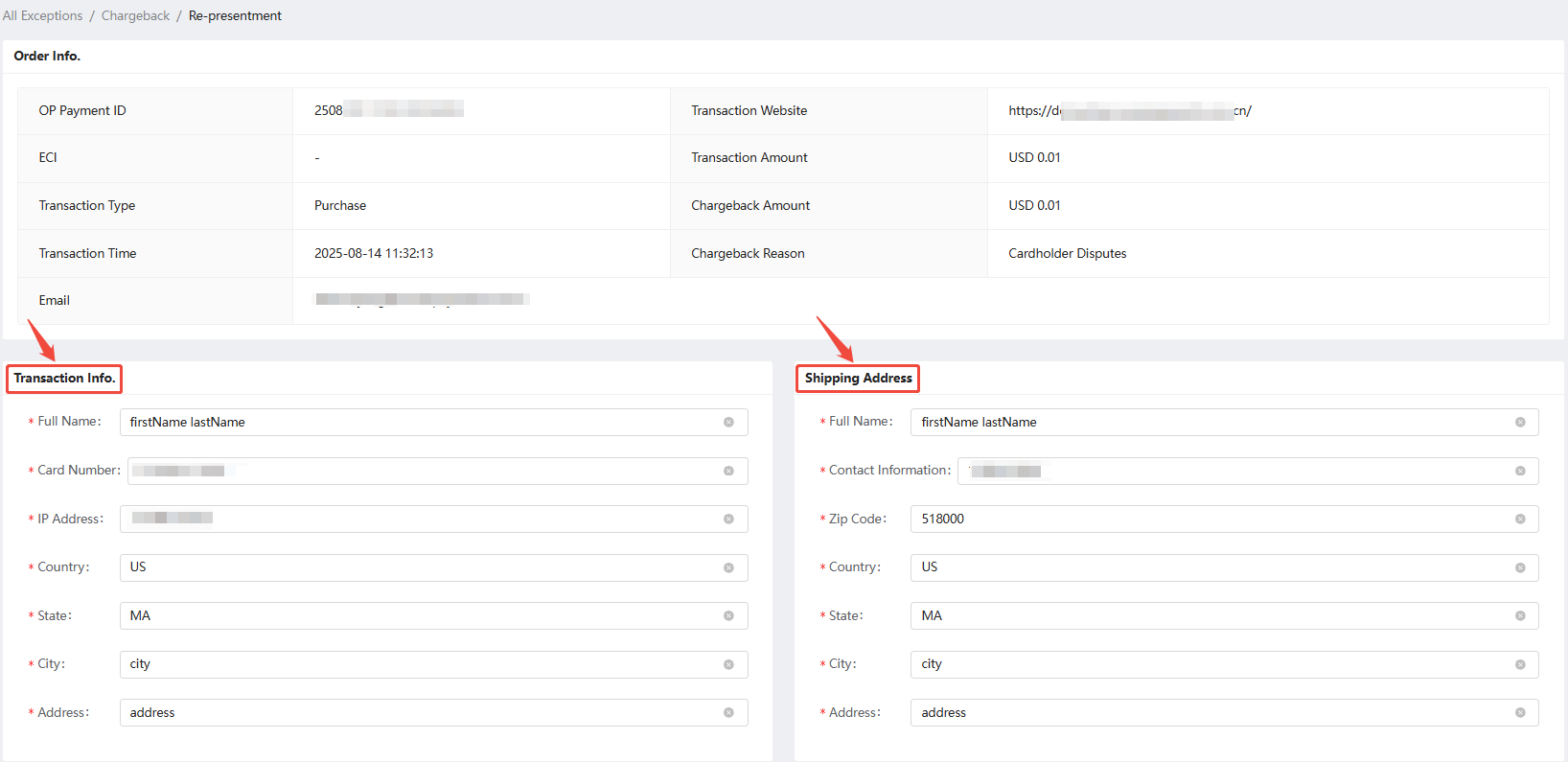
- Document should be in English
Since the working language of the acquiring bank is English, in addition to the information filled in by the cardholder, the Re-presentment document submitted by the merchant should also be in English. Please do not use Chinese.
- More comprehensive information submission
After the online upgrade of the Re-presentment document, it not only provides a more comprehensive selection of materials but also provides corresponding sample text for merchants to use. Please refer to the following illustration:

Merchants can submit multiple options and provide corresponding certification materials according to their own circumstances (1 to 5 pictures can be provided for each certification material).
In short, the more comprehensive and effective the information in the Re-presentment document is, the greater the chance of the representment to be approved.
- The supporting materials must be valid pictures.
The supporting materials must be pictures, and 1 to 5 pictures can be provided. The picture should be clear, and the single picture should be within 3M, Image size may not exceed 1800px*1500px;the picture should be related to the representation and is to support it.

For more details, please refer to the Oceanpayment Merchant Portal - Help Center: 【Guidelines for Representment】
9.4 Common problems with Re-presentment document
- Document is in Chinese
Since the working language of the acquiring bank is English, in addition to the information filled in by the cardholder, the materials submitted by the merchant must be in English. Please do not use Chinese.
- Information is inconsistent
The information on the screenshots of each complaint file is inconsistent, such as
-
Transaction details are inconsistent with the name on the credit card information
-
The delivery address in the transaction details is inconsistent with the address in the Shipping Address
-
The cardholder’s billing address is inconsistent with the cardholder’s billing address in the transaction details.
-
The Re-presentment document contains the consumer’s personal card information
Notes: Personal identity documents including ID cards, passports and cards attached to dispute response shall undergo desensitization processing.
- The goods in transit were not signed for
For chargebacks caused by " Merchandise/Services Not Received ", the shipping details of the goods that are still in transit are not allowed to be provided. You should provide the shipping details of the goods that have been signed for.
-
Unable to prove that the goods are consistent
-
For chargebacks caused by "Not as Described or Defective Merchandise/Services", you cannot only provide shipping details or product details. You should provide proof that the goods sent are consistent with the goods received by the consumer.
-
In this case, it is recommended to negotiate with the consumer first whether to return or exchange the product, so that the communication information after the agreement with the consumer can be provided when applying.
9.5 Update on Re-presentment
-
When [Initiate Re-presentment] in the account backend, the corresponding result will be updated in the account backend within 120 days of [response deadline].
-
If the [Successful Re-presentment], the result will be updated in the account backend within 120 days of the [response deadline]; if the [response deadline] exceeds 120 days, it means that the transaction [Failed].
-
Oceanpayment will update the [Successful Re-presentment] to the account backend at the end of each month.
-
To increase the chances of successful representment, please follow the Guidelines for Representment in the Oceanpayment Merchant Portal and provide complete and valid representment evidence.
-
Please note that the amount for [Successful Representment] will be settled on the settlement date of the current batch, please confirm and check.
10. Korean Local Payment Chargeback
- Korea Local Payment Dispute processing flow is as follows:
-
[Retrieval Request]: Merchant needs to reply to Korea Local Payment Bank.
-
[Chargeback]: Merchant does not respond to the dispute, or Korea Local Payment decides that the merchant's dispute re-presentment is failed.
Once Korea Local Payments incurs chargeback, the Korea Local Payments Dispute process ends and the merchant has no further opportunity to initiate re-presentment.